Secure Remote Access: 2026 Guide for Alaska Businesses
Did you know that 72% of business owners now rank remote work as their single greatest cybersecurity concern? It’s a valid worry for any Alaskan business leader. You want your team to have the flexibility to work from home in Anchorage or Wasilla, but the thought of ransomware entering through a weak home Wi-Fi connection is a constant stressor. You’ve likely dealt with the frustration of legacy VPNs that are slow, unreliable, and leave your staff feeling disconnected. Finding a way to provide secure remote access for employees shouldn’t feel like a choice between safety and productivity.
We understand that your priority is keeping your data safe while staying ahead of the 2026 HIPAA Security Rule updates. This guide will show you how to build a resilient, Zero Trust remote access strategy that protects your sensitive information and maintains compliance without slowing down your operations. You’ll gain peace of mind knowing your connection is fast and your next audit is under control. We will walk through the transition from traditional tunnels to modern access models and show you why having local, proactive support makes all the difference when things get difficult.
Key Takeaways
Understand why 2026 security requires a shift from protecting the office building to protecting the individual user, regardless of their location.
Learn how to implement a Zero Trust framework that provides secure remote access for employees while significantly reducing the risk of a network-wide breach.
Discover the specific audit trails and session logging requirements needed to maintain HIPAA compliance for your distributed Alaskan workforce.
Identify the five essential security layers, including Endpoint Detection and Response, that stop modern threats at the device level before they can spread.
See the benefits of partnering with a local guardian who integrates your digital IT strategy with physical security solutions right here in Anchorage.
Table of Contents
The Evolution of Secure Remote Access for Employees in 2026
In 2026, the physical office is no longer the center of the business world. For local teams in Anchorage and Wasilla, secure remote access for employees has become the modern digital doorway. It’s the primary way your staff connects to the tools they need to serve our community. We’ve seen a fundamental shift from office-centric security, where we focused on locking down a building, to user-centric security, which follows the person wherever they go. This evolution requires a foundation of protective vigilance. It’s about ensuring that a login from a home office in Eagle River is just as safe as one from your downtown headquarters.
Why Traditional Office Perimeters Are No Longer Enough
The old fortress model assumed that all your data lived behind a single firewall. If you were inside the building, you were trusted; if you were outside, you weren’t. Today, that wall has crumbled. With hybrid work becoming the standard, your data now travels to home offices, mobile devices, and local coffee shops. Each of these locations creates a new entry point for potential threats. Establishing a clear remote access policy is the first step in regaining control. Business owners need peace of mind that their sensitive files won’t be exposed just because an employee wants to work from a different zip code. We focus on securing the identity of the user rather than the physical location of the desk. When your security moves with your people, your business remains resilient regardless of where the work happens.
The Hidden Risks of Legacy VPN Solutions
Many businesses still rely on legacy VPNs, but these tools often create more problems than they solve. A traditional VPN creates a broad tunnel into your network. If a single employee device is compromised by malware, that tunnel allows the threat to move laterally across your entire server. It’s an all-or-nothing approach that lacks the precision required in 2026. Beyond security, old VPNs often cause significant performance bottlenecks. When connections are slow or unreliable, frustrated employees sometimes bypass security measures entirely to get their work done. Modern secure remote access for employees requires a more granular approach. You need the ability to grant access to specific applications rather than the whole network. This ensures that your team stays productive without leaving the back door open to your most sensitive data.
Implementing a Zero Trust Framework for Distributed Teams
Zero Trust isn’t a single software package you install and forget. It’s a strategic philosophy built on the rule: “Never Trust, Always Verify.” In the past, if someone had the right password, they were trusted completely. Today, we know that’s not enough. By adopting this framework, you significantly reduce the “blast radius” of a potential security breach. If an account is compromised, the damage is contained to a small area rather than your entire network. This approach provides a logical solution to the risks inherent in providing secure remote access for employees. It moves your defense from a static wall to a dynamic, responsive shield.
Core Principles of Zero Trust Network Access (ZTNA)
Think of ZTNA like a modern keycard system in an Anchorage office building. Just because someone has a badge to enter the lobby doesn’t mean they can walk into the server room or the HR files. We call this “least privilege” access. You only give your staff the specific permissions they need to do their jobs. Additionally, we implement continuous verification. Instead of checking a user once at login, the system quietly verifies their identity, device health, and location throughout the session. For example, if a device suddenly connects from a different country or shows signs of unpatched software, access is immediately restricted. This methodology aligns with CISA’s guide to securing remote access, ensuring your defenses meet federal recommendations.
Identity-First Security: MFA and SSO
The first line of defense in any Zero Trust model is identity. Multi-Factor Authentication (MFA) is no longer an optional “addressable” control; it’s a requirement for modern protection. It ensures that even if a password is stolen, the attacker can’t get in without a second form of verification like a push notification or a biometric scan. To keep things efficient for your team, we often pair this with Single Sign-On (SSO). SSO allows employees to access all their necessary tools with one secure login, which reduces “password fatigue” and improves productivity. Implementing these identity layers ensures that secure remote access for employees remains a business asset rather than a liability. This identity-first approach is a core part of Managed Cybersecurity Anchorage.
Building a Zero Trust environment is a journey that starts with understanding your current gaps. If you’re unsure where your network stands, you can request a free IT assessment to see how these strategies fit your specific business needs.
HIPAA Compliance and Data Integrity in Alaska
For healthcare providers in Anchorage and Fairbanks, the pressure to maintain HIPAA compliance has reached a critical point. With federal penalty caps for violations exceeding $2.19 million in 2026, the cost of an error is devastating. Compliance isn’t just a box to check; it’s a business continuity requirement. A single breach in our industry now averages $6.64 million, making proactive defense your most valuable asset. Implementing HIPAA Compliant IT Services ensures your patient data remains protected while your team works offsite.
Remote Access Requirements for Healthcare Providers
Transmitting Protected Health Information (PHI) over home networks requires strict encryption standards. The 2026 HIPAA Security Rule updates have officially moved encryption and multi-factor authentication from “addressable” options to mandatory controls. You must also ensure that any partner handling your data has signed a Business Associate Agreement (BAA). This document provides the legal and professional accountability needed to protect your practice. For a deeper look at local requirements, read our guide on HIPAA Compliant IT Services in Anchorage.
Maintaining Audit Trails for Remote Workers
Audit readiness depends on detailed documentation. Federal auditors want to know exactly who accessed what data and when they did it. Modern systems for secure remote access for employees create these logs automatically. This level of session logging follows the principles of Zero Trust Architecture, where every interaction is recorded and verified. These security layers work quietly in the background. Your providers can focus on patient care in Wasilla or Kenai while the system handles the technical vigilance required for an audit.
If you don’t have these logs, a federal audit becomes a significant hurdle. Managed IT services provide the straight-shooter clarity you need by generating reports that prove your compliance. It’s about proactive care. By maintaining these trails, you protect your reputation and your patients’ privacy. Secure remote access for employees should always include this level of transparency to ensure long-term stability for your practice.
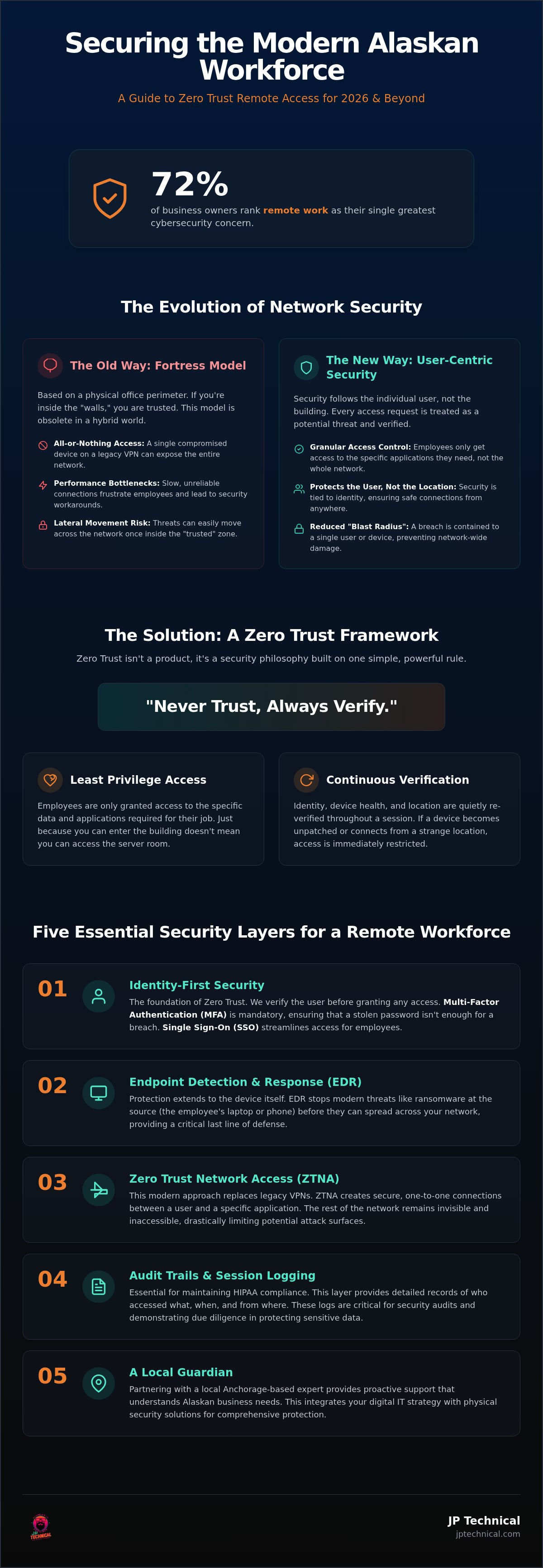
Critical Security Layers for a Modern Remote Workforce
Establishing secure remote access for employees requires more than a single piece of software. It’s a combination of tools and practices that work together to provide steady reliability for your business. Think of your security as a series of nested shields. If one layer is tested, the next one stands ready to protect your data. This layered approach ensures that your operations remain predictable even when threats evolve.
To build a truly resilient remote workforce in 2026, we focus on these five essential layers:
Identity Verification: Using MFA to ensure the person logging in is who they claim to be.
Device Integrity: Confirming the laptop or phone is clean and healthy before it connects.
Encrypted Connectivity: Protecting the data path between the remote device and your server.
Vigilant Monitoring: Watching for unusual behavior across all endpoints in real-time.
Proactive Maintenance: Keeping all applications and operating systems updated automatically.
Endpoint Detection and Response (EDR) for Remote Devices
EDR acts as a digital security camera for your employees’ workstations. While traditional antivirus only looks for known signatures of old viruses, EDR monitors behavior. It notices if a laptop suddenly starts encrypting files or trying to communicate with a suspicious server in another country. This layer is critical because it identifies threats at the source before they can travel through your network. For a broader look at how this fits into your overall strategy, see our guide on Managed IT Services in Anchorage. It’s about having a local guardian that watches over your hardware quietly in the background.
Patch Management and Automated Updates
Unpatched software remains the primary entry point for attacks targeting secure remote access for employees. Hackers look for known weaknesses in common apps like web browsers or communication tools to find a way in. If your team ignores update prompts, they leave your business vulnerable. Patch management is the proactive closing of digital backdoors. At JP Technical, we manage these updates while you sleep. This automated approach ensures your systems are always current without interrupting your workday. It provides the peace of mind you need to focus on your clients instead of your computer’s pop-up notifications. free it assessment
Partnering with a Local Managed IT Expert in Anchorage
Distant vendors often treat your business as a ticket number in a global queue. In 2026, where cyber threats move fast, waiting for a call center in another time zone isn’t a viable strategy for Alaskan business leaders. You need a local guardian who understands our community and our unique operational challenges. We believe in a no-nonsense work ethic that prioritizes human connection over automated interactions. When a complex issue arises with secure remote access for employees, you deserve a partner who can show up and resolve the problem directly.
Security in the modern era isn’t just about software. It’s about protecting every entry point to your business. Our approach integrates managed IT services with physical security solutions to provide a comprehensive shield. Whether it’s a digital breach or a physical access concern at your Anchorage headquarters, having one accountable partner ensures nothing falls through the cracks. This steady reliability allows you to focus on your growth while we handle the technical mastery in the background.
The Advantage of Local Support and Vigilance
There’s a distinct value in having a technician who knows your office layout and your team’s names. Local accountability leads to faster resolutions because we aren’t just guessing about your environment; we’ve been there. We’ve served Anchorage, Wasilla, and Fairbanks since 1996, building a reputation for showing up when things get difficult. This long-term stability means we’re invested in your success as a neighbor. We don’t just provide remote support; we provide proactive care that prevents downtime before it starts. If a remote worker in Kenai has a connectivity crisis, you have a specialist who understands the local infrastructure and can act immediately.
Taking the First Step Toward a Secure Network
Securing your network starts with a clear understanding of your current vulnerabilities. We guide you through a straightforward IT audit to identify gaps in your strategy for secure remote access for employees. This process isn’t about high-pressure sales; it’s about providing the straight-shooter honesty you need to protect your livelihood. We look at your encryption, your MFA implementation, and your audit trails to ensure everything meets 2026 standards. The goal is simple: to give you the peace of mind that comes from knowing your data is safe and your team is productive. Once we identify the risks, we implement the solutions quietly and efficiently.
Finding the right balance between accessibility and security doesn’t have to be a source of anxiety. We invite you to take the first step toward a more resilient business today. Discover how a local partnership can transform your technical hurdles into a predictable, managed asset. Request a Free IT Assessment
Building a Resilient Future for Your Alaskan Workforce
The way we work in Alaska continues to shift, but your need for data safety remains constant. Moving toward a Zero Trust framework ensures that your business stays resilient against evolving threats. By prioritizing identity-first security and mandatory encryption, you protect both your team and your reputation. Providing secure remote access for employees is now a baseline requirement for any modern practice, especially when navigating the strict 2026 HIPAA updates.
JP Technical has served as a local guardian in Anchorage since 1996. We are specialists in HIPAA-compliant IT support and offer a unique integration of physical and digital security solutions. This comprehensive approach provides the steady reliability you need to focus on your daily operations. You don’t have to handle these technical hurdles alone. A proactive partnership ensures your network remains predictable and your data stays safe. Secure your remote team with a Free IT Assessment from JP Technical We are ready to show up and help you build a stable future for your workforce. Let’s work together to ensure your business stays protected and productive.
Frequently Asked Questions
Is a VPN enough to provide secure remote access for my employees?
A traditional VPN is no longer sufficient on its own. While it provides an encrypted tunnel, it often grants broad access to your entire network once a user is inside. This creates a significant risk if a single device is compromised. Modern secure remote access for employees requires a Zero Trust approach. This ensures that every request is verified and access is limited only to the specific applications needed for the job.
How does Zero Trust Network Access (ZTNA) differ from a traditional VPN?
A traditional VPN connects a user to a network, while ZTNA connects a user to a specific application. Think of a VPN as a master key to your Anchorage office building. ZTNA is more like a smart badge that only opens the specific doors you’re authorized to enter. It continuously checks the health of the device and the identity of the user, providing a much higher level of protective vigilance than old tunnels.
What are the HIPAA requirements for employees working remotely?
The 2026 HIPAA Security Rule updates now mandate multi-factor authentication and encryption for all remote connections. You must also maintain detailed audit trails and session logs to prove who accessed Protected Health Information. If your staff in Fairbanks or Palmer works from home, your secure remote access for employees must include these layers. Failing to meet these standards can result in federal penalties exceeding $2.19 million per violation.
Can my employees use their personal computers for remote work safely?
Using unmanaged personal computers for business is a major risk. These devices often lack the latest security patches and professional-grade EDR software. If an employee’s home computer is infected with malware, that infection can spread to your business network during a remote session. We recommend providing company-issued devices that are managed by a local guardian to ensure every endpoint meets your security and compliance standards across Anchorage and Wasilla.
What is Multi-Factor Authentication and why is it mandatory for remote access?
Multi-Factor Authentication requires two or more forms of evidence to verify a user’s identity. It’s mandatory because passwords alone are easily stolen through phishing or data breaches. By requiring a second step, such as a mobile app notification or a biometric scan, you stop attackers even if they have the correct login credentials. It’s the most effective way to lower your anxiety regarding unauthorized access to sensitive company data.
How much does it cost to implement secure remote access for a small business?
Implementation costs depend on your team’s size and your current technical infrastructure. While we don’t provide flat rates without an assessment, the investment is a fraction of the record $4.99 million average cost of a data breach in 2026. Proactive defense provides long-term stability and predictable operating costs. We recommend a professional audit of your Anchorage or Wasilla business to identify the most cost-effective path toward a resilient network.
What happens if a remote employee’s laptop is lost or stolen?
If a device is managed by JP Technical, we can initiate a remote wipe to delete all sensitive data immediately. Strong disk encryption ensures that even if a thief has the physical hardware, they can’t read the files inside. This protective vigilance allows you to maintain peace of mind if a laptop goes missing in Kenai or Anchorage. Proactive management turns a potential disaster into a manageable hardware replacement issue.
Does secure remote access slow down my employees’ internet connection?
Modern security solutions often improve connection speeds compared to legacy systems. Traditional VPNs often route all traffic through a single office server, which creates a bottleneck. Modern Zero Trust models use a distributed architecture that connects employees directly to their applications. This reduces latency and ensures your team stays productive without the frustration of a slow connection. It’s a faster, more reliable way to handle remote work in our local community.
 Article by
Colter Hobbs