Cloud Migration for Small Businesses: The 2026 Alaska Guide
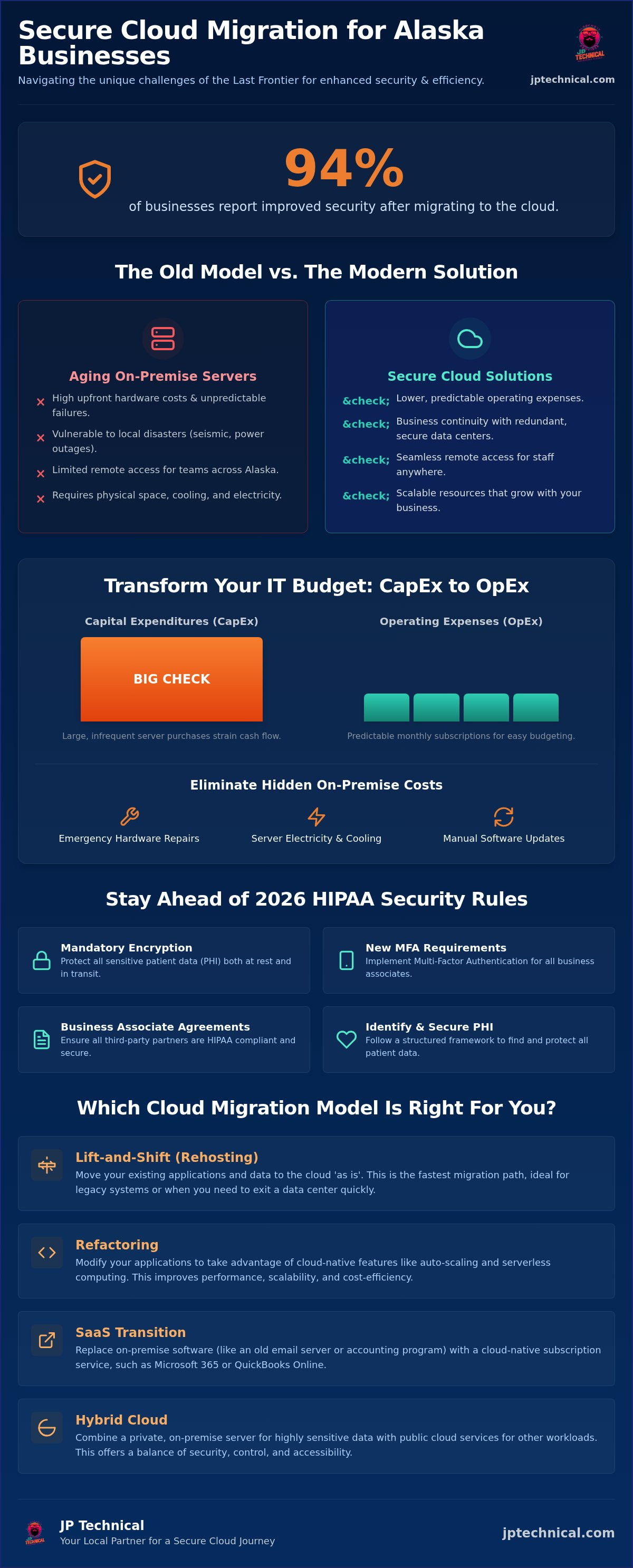
Recent data shows that 94% of businesses report improved security after making the switch, yet many Alaska owners still hesitate. You might worry that cloud migration for small businesses in the Last Frontier means risking your data to unstable connections or facing massive downtime. It’s a valid concern when your server is sitting in an office in Anchorage or Fairbanks and the cloud feels like it’s thousands of miles away. You want the benefits of remote access and lower IT costs, but you can’t afford a single hour of lost productivity or a breach of sensitive medical data.
We understand the pressure of keeping up with the 2026 HIPAA Security Rule changes, including mandatory encryption and new MFA requirements for business associates. This guide explains how to transition your Alaska business to the cloud securely while maintaining a predictable, scalable budget. We’ll cover everything from navigating local latency issues to choosing a partner who can be on-site when you need them. You’ll discover how to modernize your operations and gain compliance peace of mind without the typical migration headaches.
Key Takeaways
Learn why shifting from aging on-premise servers to flexible cloud subscriptions reduces maintenance costs and supports remote teams across the Mat-Su Valley.
Understand the difference between rehosting and refactoring to ensure your cloud migration for small businesses is fast, efficient, and tailored to your specific software needs.
Discover technical strategies to overcome Alaska’s unique latency hurdles and how to build a redundant network that keeps your cloud access stable.
Follow a structured framework for identifying PHI and securing Business Associate Agreements to maintain strict HIPAA compliance during your transition.
Identify the critical criteria for selecting a local IT partner who offers the accountability and on-site support necessary for long-term operational stability.
Table of Contents
Why Alaska Small Businesses are Prioritizing Cloud Migration in 2026
Understanding Cloud Migration Models: Which is Right for You?
Why Alaska Small Businesses are Prioritizing Cloud Migration in 2026
For decades, Alaska business owners managed their technology by purchasing expensive, noisy servers every few years. By 2026, that model has become a liability. Maintaining aging on-premise hardware in Anchorage or Fairbanks creates a cycle of high upfront costs and unpredictable failures. Today, cloud migration for small businesses is the standard for those who want to stay competitive and secure. It moves your critical data off the office floor and into a protected environment that doesn’t rely on a single piece of hardware.
This transition allows your staff in Wasilla, Kenai, or Palmer to work together seamlessly. It removes the physical constraints of our vast geography. Small firms now access the same high-level tools as national corporations without needing a massive IT department. This shift levels the playing field, giving local Anchorage businesses the agility to grow quickly while keeping overhead low. To better understand this concept, watch this helpful video:
Moving from CapEx to OpEx: Managing Your IT Budget
Writing a “big check” for a server replacement every five years is a significant strain on any local budget. Cloud models replace these heavy capital expenditures (CapEx) with predictable operating expenses (OpEx). If you partner with JP Technical’s managed IT services, your technology costs transform into a steady, manageable monthly line item. This approach provides true scalability. You can add or remove users and storage as your business changes, ensuring you never pay for resources you don’t use. Transitioning to the cloud eliminates several hidden costs:
Emergency hardware repairs and local parts sourcing.
Electricity and cooling costs for on-site server rooms.
Labor costs for manual software updates and physical backups.
Familiarizing yourself with various cloud computing models is the first step toward choosing a subscription that matches your specific daily workflow. It ensures your cloud migration for small businesses stays within budget while meeting your performance needs.
Business Continuity in the Last Frontier
Alaska presents environmental risks that businesses in the Lower 48 rarely face. From seismic activity to severe winter power outages, your physical office is often at the mercy of the elements. If your data lives on a single server under a desk, one local disaster can stop your operations for weeks. Cloud systems protect your information by hosting it in secure, redundant data centers far from local hazards. This setup ensures your team has 24/7 access to critical files even when the office is inaccessible due to road closures or utility failures. Cloud resilience is the ability to operate anywhere in Alaska regardless of local hardware status. It provides the peace of mind that your business stays open, no matter what the weather does outside.
Understanding Cloud Migration Models: Which is Right for You?
Choosing the right path for cloud migration for small businesses depends entirely on your current software and your long-term goals. Not every application needs a total overhaul, and not every database belongs in a public environment. Selecting the wrong model can lead to unnecessary costs or performance issues that frustrate your team. We typically see four primary paths for Alaska firms:
Lift-and-Shift (Rehosting): Moving your existing applications to the cloud exactly as they are.
Refactoring: Modifying your applications so they can take full advantage of cloud-native features like auto-scaling.
SaaS Transition: Replacing local software, such as an old email server, with cloud-native versions like Microsoft 365.
Hybrid Cloud: Keeping sensitive data on a local server while moving specific workloads to the cloud for better accessibility.
The Pros and Cons of ‘Lift-and-Shift’
Rehosting is often the starting point for Alaska businesses because it’s the fastest route. It requires the least amount of downtime and doesn’t involve complex code changes. If you need to exit an aging server room quickly, this is your best option. However, pitfalls exist. Some legacy applications don’t perform well in a cloud environment, leading to high resource consumption and unexpected monthly bills. At JP Technical, we perform a thorough software readiness assessment before any move. We identify which apps will thrive and which might require a different approach. If you’re unsure where your current setup stands, a free IT assessment can clarify your software’s cloud compatibility.
Choosing Between Public, Private, and Hybrid Clouds
Public clouds like Microsoft Azure or AWS offer massive scalability and lower costs for general business needs. They’re excellent for standard office applications and remote collaboration. If you handle highly sensitive medical data or have strict proprietary requirements, a private cloud offers a more isolated, controlled environment.
For many in the Mat-Su Valley or Fairbanks, a hybrid approach is the most practical choice. This model addresses the “latency” issue by keeping high-demand files on a local server while using the cloud for backups and remote access. It balances the need for speed with the flexibility of the cloud. We help you match these models to your growth goals, ensuring your infrastructure is a stable foundation rather than a bottleneck. Your migration should be a steady progression toward better reliability, not a frantic leap into the unknown.
Navigating Connectivity and Security Challenges in Alaska
Alaska’s geography creates unique friction for cloud migration for small businesses. While the cloud offers operational freedom, it relies on a consistent pipe to the outside world. Latency is a common hurdle for firms in remote areas or even within Anchorage during peak usage. If your data must travel through thousands of miles of fiber before reaching your screen, performance suffers. We solve this by implementing local caching strategies and optimizing network traffic to ensure your applications feel snappy and responsive.
Relying on a single internet service provider is a significant risk in the Last Frontier. In 2026, a stable cloud strategy requires redundant connections. Many local firms utilize a primary fiber plan from providers like Alaska Communications or GCI, backed up by a secondary link from a different carrier or a satellite service. If one provider experiences an outage, your cloud access remains reachable. This redundancy is the backbone of a reliable remote work environment, ensuring your team stays productive regardless of local utility issues.
Moving data to the cloud doesn’t mean it’s automatically safe from intruders. Cybersecurity requires proactive care and constant vigilance. We implement Managed EDR (Endpoint Detection and Response) and advanced Antivirus to monitor your systems 24/7. These tools act as a silent guardian, catching threats at the device level before they can compromise your cloud environment. In a cloud-first world, your security perimeter is no longer defined by your office walls; it’s defined by the integrity of your users’ identities and devices.
Security Beyond the Office Walls
Protecting your team in Wasilla or Fairbanks requires extending your defense to every remote endpoint. Multi-Factor Authentication (MFA) is a mandatory shield for cloud access that prevents unauthorized logins even if a password is stolen. Our managed cybersecurity Anchorage services ensure that only authorized personnel can touch your sensitive data. We manage these security layers in the background, allowing your employees to work securely from any location without technical friction.
Local Support vs. Global Help Desks
Global cloud providers often treat small businesses like a ticket number in an endless queue. When a migration stalls or a connection drops, you shouldn’t have to explain your location to a help desk thousands of miles away. There’s a distinct advantage to having a local technician who understands the specific connectivity quirks of the Mat-Su Valley. JP Technical takes a neighborly approach to troubleshooting. We value human connection and provide the steady, local accountability that global help desks can’t match. If a problem requires an on-site presence, we’re ready to show up and resolve it.
A Step-by-Step HIPAA-Compliant Migration Framework
Transitioning a medical practice or a healthcare-adjacent firm requires a methodical approach to ensure patient privacy remains intact. For local providers, cloud migration for small businesses isn’t just about efficiency; it’s about strict adherence to federal standards. If you handle Protected Health Information (PHI), your move must follow a structured path to avoid heavy fines and data breaches. We follow a five-phase framework designed to keep your Alaska practice secure and compliant.
The process begins with a comprehensive data audit. We identify every location where PHI lives, from local desktop folders to old backup drives. Once we know what needs protection, we move to platform selection. We only recommend cloud providers that offer robust security features and, crucially, are willing to sign a Business Associate Agreement (BAA). Without this document, your migration cannot legally proceed.
As of the 2026 HIPAA Security Rule changes, encryption is mandatory for all electronic PHI. We ensure your data is unreadable to unauthorized parties while it’s sitting in storage and while it’s moving across the network. Next, we implement granular access controls. We set up “need-to-know” permissions so employees only access the specific files required for their roles. Finally, we perform a post-migration audit. This verification step ensures the new environment is fully sealed and compliant before you resume normal operations.
The Business Associate Agreement (BAA) Explained
A BAA is the legal contract that tethers cloud providers to HIPAA standards. It’s a non-negotiable requirement for any healthcare firm moving to the cloud. This document ensures the vendor accepts their share of responsibility for protecting your patient data. JP Technical manages this vendor vetting for you. We verify that every partner meets the updated 2026 BAA requirements, which now include mandatory biannual vulnerability scans and multi-factor authentication.
Access Controls and Physical Security
Digital security doesn’t exist in a vacuum. Your cloud safeguards must align with your physical security and surveillance. If your cloud logins are airtight but your office is vulnerable, your compliance is incomplete. We help you integrate door badge systems and remote access protocols with your cloud identity management. This holistic approach ensures that only authorized personnel can enter your physical or digital workspace. For more detailed guidance on protecting your practice, see our HIPAA compliant IT services. Schedule your free HIPAA readiness audit
Choosing a Local Partner for Your Cloud Journey
Choosing a partner for your cloud journey is one of the most critical decisions you’ll make for your company’s long-term stability. While global providers offer automated tools, they lack the local accountability that Alaska businesses require. A successful cloud migration for small businesses isn’t a “set and forget” project. It’s an ongoing relationship that requires a partner who understands your specific operational environment. You need someone who knows the difference between a connectivity issue in Fairbanks and a hardware failure in Anchorage.
Transparency is the foundation of trust in these partnerships. You should expect clear migration timelines and predictable pricing before any data moves. A reputable Managed Service Provider (MSP) won’t hide behind technical jargon or vague estimates. Instead, they’ll provide a roadmap that aligns with your specific budget and growth goals. Starting with a professional evaluation allows you to identify potential roadblocks early, ensuring your transition is smooth and documented from day one. This proactive approach prevents the overspending and poor planning that often plagues cloud projects.
Why Experience in Anchorage Matters
Understanding the local business culture from Palmer to Kenai is something that can’t be replicated by a remote help desk. Since our founding in 1996, we’ve spent 30 years building deep roots in the Alaska IT market. We’ve seen technology evolve from simple local networks to the complex cloud ecosystems of 2026. This history allows us to act as a seasoned guardian for your data. We value human connection and direct communication over automated ticketing systems. When a problem arises, you have access to local experts who are ready to show up and resolve the issue quickly.
This localized expertise means we understand the unique challenges of the Last Frontier. We know how to navigate the regional connectivity quirks and environmental risks discussed earlier in this guide. Having a neighborly professional on your side provides a level of reassurance that global vendors simply can’t offer. It ensures your cloud migration for small businesses is handled by someone who shares your community values and work ethic.
Next Steps: Starting Your Migration
Preparing your team for the transition is just as important as the technical setup. Change can be stressful for staff, but a structured plan lowers anxiety. We suggest starting with an internal review of your most critical workflows to determine which applications need to move first. Once you have a clear picture of your daily needs, the next step is a professional evaluation of your current infrastructure.
Scheduling your Free IT Assessment is the best way to map your cloud path. This assessment provides a clear look at your software readiness and security status without any upfront commitment. It’s a no-nonsense look at what your business needs to thrive in a cloud-first environment. Contact JP Technical today to secure your business’s future in the cloud and gain the peace of mind that comes with a reliable, local partner.
Securing Your Business’s Future in the Alaska Cloud
Modernizing your infrastructure is no longer a luxury for Alaska firms. Successful cloud migration for small businesses requires balancing technical efficiency with strict regulatory compliance. You’ve seen how shifting to a predictable operating model reduces the burden of aging hardware while providing your team the flexibility to work from anywhere in the Mat-Su Valley or Fairbanks. By prioritizing security and choosing the right migration model, you can eliminate the fear of downtime and focus on your core operations.
Since 1996, JP Technical has served as a local guardian for businesses across the state. Our team of HIPAA-compliant security experts understands the unique connectivity hurdles of the Last Frontier. We provide the steady, neighborly support you need to transition with confidence and maintain long-term operational stability. Whether you’re in Anchorage or a more remote location, we’re ready to show up and guide you through the complexities of the modern digital landscape. Schedule Your Free Cloud Readiness Assessment Taking the first step today ensures your data remains protected and your business stays resilient for years to come. We look forward to helping you navigate this journey with the expertise and care your practice deserves.
Frequently Asked Questions
Is cloud migration safe for small businesses with sensitive data?
Cloud environments are highly secure when configured correctly by professionals. Modern providers offer security features that typically exceed what a small office can maintain on its own. We implement Managed EDR and multi-factor authentication to create a protective barrier around your information. For healthcare providers, we ensure every technical layer meets the 2026 HIPAA Security Rule requirements, keeping your sensitive patient records safe from unauthorized access.
How much does cloud migration typically cost for an Anchorage business?
Costs vary depending on your data volume and the complexity of your current software. Instead of paying a large upfront fee for physical hardware, you’ll shift to a predictable monthly operating expense. This model allows you to scale your IT budget as your business grows or changes. We provide transparent pricing after an initial assessment, so you’ll know exactly what to expect before the transition begins.
Will my business experience downtime during the cloud migration process?
We plan every migration to minimize or eliminate downtime, often performing the final cutover during off-hours. By using a phased approach, your team can continue working on local systems while data syncs to the cloud in the background. If a specific application requires a brief pause, we’ll coordinate that window with you well in advance. Our goal is a steady transition that doesn’t interrupt your daily productivity.
Do I still need local backups if my data is in the cloud?
Maintaining a secondary backup is a critical part of a resilient disaster recovery strategy. While cloud providers have their own redundancies, a secondary backup protects you against accidental deletion or provider-side issues. We implement Backup and Disaster Recovery solutions that ensure your information is always reachable. This multi-layered approach provides true peace of mind for business owners in the Mat-Su Valley and beyond.
Can JP Technical help with HIPAA compliance during the migration?
Absolutely, we specialize in HIPAA-compliant IT services for healthcare providers across Alaska. We handle the technical heavy lifting, including signing Business Associate Agreements and implementing mandatory encryption for data at rest and in transit. Our team stays current on the 2026 HIPAA updates, ensuring your cloud migration for small businesses meets every federal standard. We act as your local guardian to keep your practice compliant.
What happens if our internet goes out in Wasilla, can we still work?
If your primary internet fails, you can still work by using a redundant connection or a mobile hotspot. We often set up secondary links from different carriers to ensure your cloud environment stays reachable during local outages. Some cloud applications also offer offline modes that sync your progress once the connection returns. We design your network to be resilient, so a single utility failure doesn’t stop your operations.
How long does a typical cloud migration take for a small office?
A standard migration for a small office usually takes between two to four weeks from the initial audit to the final cutover. The timeline depends on the amount of data being moved and the migration model you choose, such as a lift-and-shift or a SaaS transition. We provide a clear schedule at the start of the project. This methodical pace ensures every security setting is verified before your team logs in.
Do I need to buy new hardware to move to the cloud?
No, one of the primary benefits of the cloud is the ability to use your existing workstations and laptops. Since the heavy processing happens in the data center, you don’t need to invest in powerful on-premise servers. If your current computers are very old, we might suggest minor upgrades to ensure they can handle modern security software. Otherwise, you can keep using the hardware you already own while reducing your maintenance costs.
 Article by
Colter Hobbs