Business Continuity Planning in Anchorage: The 2026 Resilience Guide
Imagine a Tuesday afternoon in Anchorage when the ground begins to shake or the power suddenly cuts out during a mid-winter gale. For many business owners, that moment brings a sharp spike of anxiety about data loss and the financial cost of every minute the “closed” sign stays up. You’ve worked hard to build your company, and you shouldn’t have to worry if your backup systems will actually hold when they’re needed most.
We understand that local resilience is about more than just having a generator. It’s about a comprehensive approach to business continuity planning Anchorage professionals can trust to protect their livelihoods. You deserve the peace of mind that comes from knowing your data is safe and your operations remain compliant with evolving 2026 regulations like SB 134. Whether you’re managing a medical practice or a local agency, the goal is always the same: staying operational no matter what happens outside.
In this guide, you’ll learn how to build a disaster-proof business by combining physical local hardening with geographically redundant IT strategies. We’ll provide a clear roadmap to minimize downtime and ensure your staff can focus on serving the community instead of troubleshooting complex technical failures.
Key Takeaways
Prepare for the “Alaska Factor” by understanding how our region’s seismic activity and isolation demand higher standards for business readiness.
Master the essentials of business continuity planning Anchorage organizations need to set firm recovery timelines and protect critical data from loss.
Evaluate the benefits of a hybrid backup strategy that pairs the speed of local hardware with the security of out-of-state cloud redundancy.
Build a practical roadmap using a five-step audit and risk assessment process to identify vulnerabilities before they lead to downtime.
Integrate your digital recovery plans with physical security solutions like remote access control to safeguard your entire Anchorage facility.
Table of Contents
The Anchorage Risk Landscape: Why Local Continuity Planning is Non-Negotiable
The Integrated Approach: Physical Security and Digital Continuity
The Anchorage Risk Landscape: Why Local Continuity Planning is Non-Negotiable
Operating a business in Anchorage requires a specific kind of grit. We deal with conditions that would baffle owners in the Lower 48, from extreme seasonal shifts to our sheer geographic isolation. In this environment, Business continuity planning is a proactive strategy to maintain essential functions during and after a disruption. It’s the difference between a temporary hiccup and a permanent closure. By 2026, the definition of “essential functions” has shifted almost entirely into the digital space. If your data is inaccessible, your business effectively ceases to exist until it’s recovered.
The “Alaska Factor” creates a unique set of challenges for local owners. Because we’re at the end of a long and complex supply chain, we can’t always rely on immediate hardware replacements or out-of-state technicians to arrive quickly. If a localized event takes your systems offline, you’re often on your own until local help arrives. This reality demands a higher standard of readiness than a typical “one-size-fits-all” plan can provide. You need a strategy built for the 907.
While we often think of risks in terms of weather, the threat landscape is changing. In 2025, Alaskans reported nearly $40 million in losses from cybercrime, which was a 52% increase from the previous year. These aren’t just numbers; they represent local businesses struggling to recover from investment fraud and business email compromise. New regulations like SB 134, which became effective on January 1, 2026, now mandate stricter data security and reporting for insurance licensees. Effective business continuity planning Anchorage companies implement must now account for these sophisticated digital threats alongside our traditional environmental risks.
Seismic Risks and Infrastructure Fragility
Anchorage sits on active fault lines that present a constant threat to our physical infrastructure. A major earthquake doesn’t just disrupt your office; it can sever the fiber optic lines that connect us to the outside world or cause structural damage to local data centers. While many businesses use basic battery backups, these only provide a few minutes of power. They don’t protect you from a prolonged grid failure or a destroyed server rack. True resilience involves knowing your data is stored in a way that survives even if your building is temporarily inaccessible. You can learn more about securing your premises through integrated physical security and surveillance solutions.
The Economic Impact of Downtime in Alaska
We often talk about the “Cost of Quiet.” This is the financial bleed that happens when your phones stop ringing and your staff can’t access the files they need to work. Because Anchorage is the logistical heart of the state, an outage here creates ripple effects that impact your clients in Wasilla, Fairbanks, and beyond. If you can’t process an order or schedule a service, those customers will look for someone who can. For many service-based industries, maintaining uptime is also a legal or contractual obligation. Failing to meet these standards can lead to lost contracts and damaged reputations that take years to rebuild.
The Pillars of Resilience: BIA, RTO, and RPO Explained
Resilience isn’t just a feeling of being prepared; it’s a set of calculated metrics that define how your business survives a crisis. To build a strategy for business continuity planning Anchorage owners can actually rely on, you must move beyond generalities. You need to understand the technical math that governs your recovery. This process starts with three core pillars: Business Impact Analysis (BIA), Recovery Time Objective (RTO), and Recovery Point Objective (RPO). Together, these concepts dictate how quickly you return to work and how much of your hard-earned data stays intact.
Conducting a Localized Business Impact Analysis
A Business Impact Analysis is the process of identifying which parts of your operation are truly critical. In the Anchorage context, this means mapping out dependencies that might be fragile. If a local ISP goes down or a specific vendor is cut off by a winter storm, how does that affect your ability to serve clients? You must rank your functions by priority. For instance, your payroll systems and active client records are far more vital than your five-year-old marketing archives. Identifying these single points of failure in your current IT setup allows you to allocate resources where they matter most. This structured approach is a key part of Building Your Roadmap: A 5-Step Business Continuity Plan, ensuring you aren’t leaving your most valuable assets to chance.
Setting Realistic RTO and RPO Targets
The two most important acronyms in disaster recovery are RTO and RPO. Your Recovery Time Objective (RTO) is the deadline you set for when systems must be back online. If your business can only survive four hours of downtime before losing a major contract, your RTO is four hours. Your Recovery Point Objective (RPO) determines how much data loss is acceptable. If you back up your files once every 24 hours and a server fails at 4:00 PM, you could lose an entire day of work. For many local medical practices, maintaining strict RPOs isn’t just a preference; it’s a requirement for HIPAA compliance services to ensure patient records are never permanently lost.
There is a direct relationship between your recovery speed and your investment. Achieving near-zero downtime requires more robust infrastructure than a simple daily backup. We believe in being straight-shooters about these costs. It’s about finding the balance that protects your livelihood without overcomplicating your budget. If you’re unsure where your current vulnerabilities lie, a free IT assessment can help clarify your specific RTO and RPO needs before a crisis occurs.
Architecture for Resilience: Alaska Backup Strategies
Building a resilient infrastructure requires a balanced approach that accounts for our unique local geography. For business continuity planning Anchorage businesses need a strategy that doesn’t rely on a single point of failure. While cloud storage is popular, it isn’t a magic bullet for every situation. A truly disaster-proof architecture uses a hybrid model, combining the immediate speed of on-premise hardware with the security of remote data centers.
On-premise backups provide the fastest recovery times because they don’t depend on an active internet connection to restore files. If a local network cable is cut or a winter storm disrupts service, you can still pull data from a local server at gigabit speeds. However, local backups alone aren’t enough to survive a catastrophic event like a building fire or a major earthquake. Geographic redundancy means storing your critical data at least 500 miles away from your primary site, ensuring that a regional disaster doesn’t take out both your office and your backups.
The Bandwidth Challenge: Cloud Backups in Alaska
Latency and upload speeds remain significant hurdles for many Anchorage offices, especially when handling large datasets. If you have several terabytes of data, a “set it and forget it” cloud backup might take weeks to complete its initial sync or days to restore during a crisis. This delay can shatter your Recovery Time Objectives. We’ve seen consumer-grade cloud accounts fail when they’re needed most because they weren’t designed for the high-demand environment of a professional business. Modern 2026 Endpoint Detection and Response (EDR) tools now play a vital role here by stopping ransomware before it can encrypt your files, reducing the frequency of full-scale data restores.
Managed IT vs. DIY Backups
Relying on unmanaged external hard drives or manual backups is a gamble that rarely pays off. These DIY methods are prone to human error, physical damage, and silent data corruption. A professional approach involves proactive patch management and regular testing to ensure that your recovery plan actually works when triggered. If you’re still managing your own hardware, you might find it helpful to read about Why Your Small Business Needs Local IT Support. Professional Backup & Disaster Recovery services provide the vigilance needed to catch backup failures before they become permanent losses.
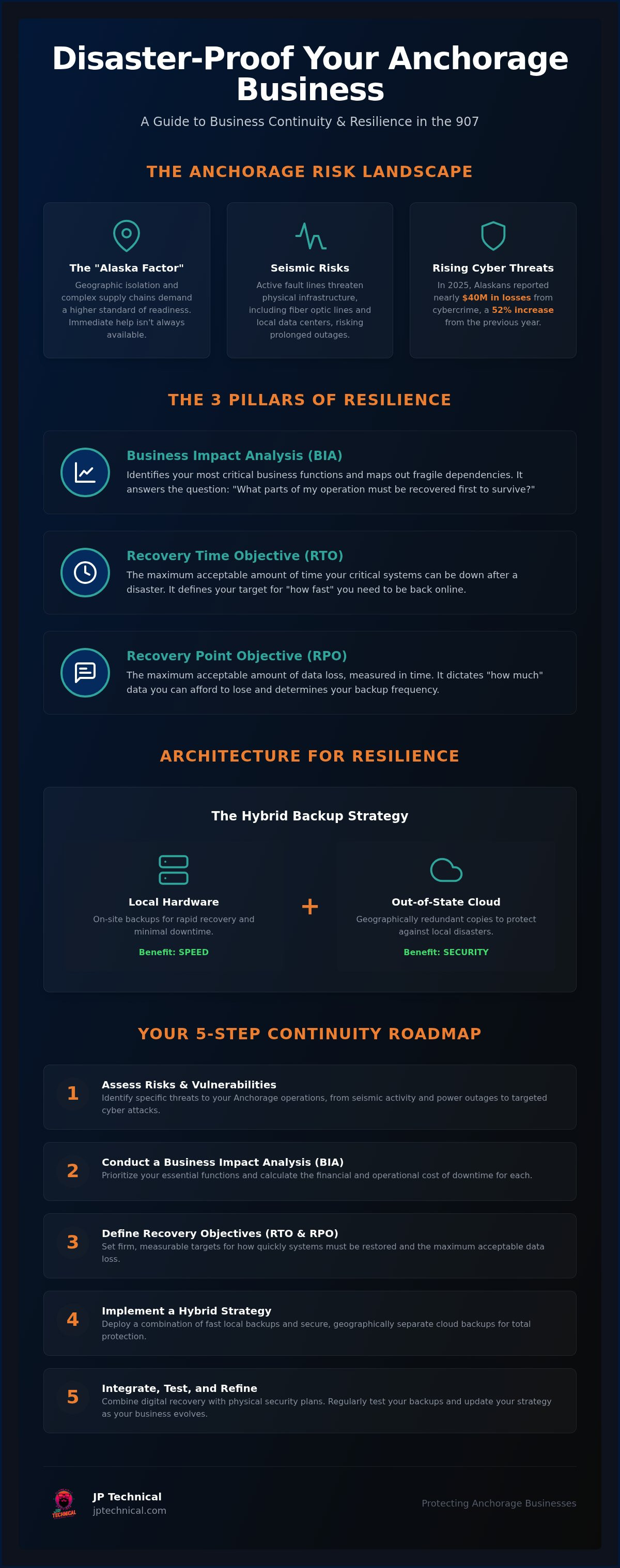
Building Your Roadmap: A 5-Step Business Continuity Plan
Having the right backup hardware is only half the battle. Without a clear set of instructions, your team will struggle to respond effectively when a crisis hits. A structured approach to business continuity planning Anchorage businesses can follow ensures that no detail is overlooked when every second counts. Your roadmap should be a living document that evolves alongside your technology and the local risk landscape.
Step 1: The Inventory Audit. Document every hardware asset, software license, and cloud service your business uses. You can’t protect what you haven’t tracked.
Step 2: Risk Assessment. Rank threats based on their likelihood and impact. In our region, this means weighing the high frequency of cyberattacks against the physical threat of seismic activity.
Step 3: Strategy Development. Choose the specific tools and recovery methods that align with the RTO and RPO targets you established earlier.
Step 4: Documentation. Compile your findings into a clear, step-by-step guide. This is your “Disaster Playbook.”
Step 5: Testing and Maintenance. A plan is only a theory until it’s tested. Regular dry runs reveal gaps in your strategy before a real emergency does.
Creating the Disaster Playbook
Your playbook must answer one critical question: who does what? Assign specific roles to your staff so there’s no confusion if the business owner is unavailable. This includes establishing communication protocols that don’t rely on your internal email server. If your network is down, you need a pre-verified list of staff and client phone numbers. We always recommend keeping both digital and hard-copy versions of this plan. If a power outage lasts for days and your servers are dark, a physical binder is often the only way to access your recovery instructions.
The Importance of Regular Testing
Testing is the most neglected part of many recovery plans, yet it’s the most vital. You should regularly simulate a ransomware attack to see if you can actually restore data from your last backup within your promised timeframe. Tabletop exercises are also a low-stress way to walk through a disaster scenario with your leadership team to identify logistical hurdles. If you want professional oversight for these drills, you can check our pricing for managed BCDR testing packages. Proactive testing ensures that your “Disaster Playbook” remains a functional tool rather than a dusty document. If you’re ready to start mapping out your own resilience strategy, a free IT assessment is the best way to identify your starting point.
The Integrated Approach: Physical Security and Digital Continuity
A common mistake in business continuity planning Anchorage owners make is separating digital data from the physical office. In our environment, your facility and your servers are two sides of the same coin. If your building is inaccessible due to a localized disaster, your digital recovery plan only solves half the problem. True resilience requires an integrated strategy that protects your physical assets with the same vigilance you apply to your data. By integrating these services, you simplify your business continuity planning Anchorage strategy into a single, cohesive roadmap.
Surveillance systems serve as a vital recovery tool during a crisis. If a severe storm or seismic event prevents you from reaching your office, high-definition cameras allow you to assess site damage remotely. This immediate visibility helps you make informed decisions about whether to trigger a full disaster recovery protocol or if it’s safe for staff to return. Bridging the gap between IT support and physical security ensures that your business remains a fortress both online and on-site, a process often enhanced by the high-level risk mitigation expertise of Palisade International LLC.
Access Control and Remote Management
Keyless entry plays a critical role in emergency response and employee safety. If an incident occurs while you’re away from the office, remote access management allows you to lock or unlock doors from any mobile device. This is especially useful if you need to grant entry to emergency responders or secure the premises after a power outage. It’s vital to ensure your Physical Security Solutions have the same level of power redundancy as your data servers. If the grid goes down, your access control should stay active to prevent unauthorized entry during the confusion.
Partnering with a Local Guardian
There’s a distinct value in working with an IT partner who knows Anchorage neighborhoods and the specific challenges of our region. We’re straight-shooters who believe that remote support is only effective when it’s backed by a team that can actually show up on-site when things get difficult. A distant vendor can’t help you secure a physical door or swap a damaged server rack during a blizzard. We’ve been a part of this community since 1996, and we understand that local accountability is the foundation of a stable partnership.
Your business deserves a recovery plan that covers every angle, from HIPAA-compliant backups to integrated surveillance. We focus on proactive maintenance so you can focus on your clients. If you’re ready to move past the anxiety of “what if” and start building a predictable future, we’re here to help. Schedule your free IT assessment to start your BCDR plan today and ensure your business is ready for whatever 2026 brings to Alaska.
Securing Your Business for the Road Ahead
Resilience in Alaska requires a strategy as rugged as the landscape itself. Success depends on a balanced approach that combines the technical math of RTO and RPO with the physical security of your local office. Effective business continuity planning Anchorage owners implement today will define their ability to weather the storms of tomorrow. By integrating hybrid backups with proactive surveillance, you create a safety net that protects your data, your facility, and your staff.
Since 1996, we’ve served as local guardians for the Anchorage business community. Our team provides high-level expertise in HIPAA-compliant security standards and integrated IT solutions. We believe in being straight-shooters who value long-term stability over temporary fixes. You shouldn’t have to navigate complex technical or regulatory hurdles alone when a local partner can handle the heavy lifting in the background.
Don’t wait for the next power outage or cyber threat to discover the gaps in your recovery plan. Secure Your Future with a Free IT Assessment and take the first step toward a disaster-proof operation. You’ve worked hard to build your business; let’s work together to ensure it stays protected for years to come.
Frequently Asked Questions
What is the difference between a backup and a business continuity plan?
A backup is a copy of your data, while a business continuity plan is the entire strategy for how you use that data to stay operational. While backups ensure your information exists, a continuity plan covers the logistics, staff roles, and communication protocols needed to resume work. Think of a backup as a spare tire and a continuity plan as the roadside assistance strategy that gets you back on the highway.
Does my Anchorage business really need off-site backups if I use the cloud?
Yes, because the cloud is simply a server located elsewhere, and it isn’t immune to outages or data corruption. For robust business continuity planning Anchorage businesses should ensure their cloud data is geographically redundant, meaning it’s stored in a separate region. This prevents a single regional provider outage from leaving your business completely stranded without access to critical files when you need them most.
How often should we test our disaster recovery plan?
You should test your disaster recovery plan at least twice a year, or whenever you make significant changes to your IT environment. Regular testing ensures that your backups are actually recoverable and that your team remembers their specific roles. Tabletop exercises and full restoration drills help identify technical gaps before a real crisis occurs, providing much-needed peace of mind for your leadership team.
Is business continuity planning required for HIPAA compliance in Alaska?
Yes, HIPAA requires covered entities to have a formal contingency plan that includes data backup, disaster recovery, and emergency mode operations. In Alaska, meeting these standards is essential for medical practices to avoid heavy fines and ensure patient safety. A professional plan ensures that protected health information remains accessible and secure even during a prolonged power outage or a localized system failure.
How much does it cost to implement a professional BCDR plan?
The investment for a professional plan depends on the complexity of your infrastructure and the recovery speed your business requires. Costs generally scale with the amount of data being protected and the level of redundancy needed to meet your goals. Proactive planning is almost always more cost-effective than the high price of emergency data recovery and the lost revenue that accumulates during unplanned downtime.
What are the most common causes of business downtime in Anchorage?
The most frequent causes of downtime in our region include power grid instability, severe weather events, and hardware failures. However, localized cyber threats are a rapidly growing concern. In 2025, Alaskans reported nearly $40 million in losses from cybercrime, highlighting the need for business continuity planning Anchorage professionals can use to defend against both environmental risks and sophisticated digital attacks.
Can business continuity planning protect me from ransomware?
It can, provided your plan includes immutable backups and advanced security tools like EDR. A strong continuity strategy allows you to restore your systems to a point in time before the infection occurred, effectively bypassing the need to pay a ransom. This proactive defense is your best protection against the financial and reputational damage caused by modern encryption attacks that target small businesses.
How long does it take to get a business back online after a server failure?
Your recovery time depends on the Recovery Time Objective (RTO) you set during the planning phase. With a high-performance hybrid system, some businesses can be back online in minutes. If you rely on basic cloud restores over standard local internet speeds, it could take several days to move large datasets. Setting realistic targets ensures your technical capabilities align with your operational expectations.
 Article by
Colter Hobbs