How to Plan an Access Control Installation in Anchorage: A 2026 Business Guide
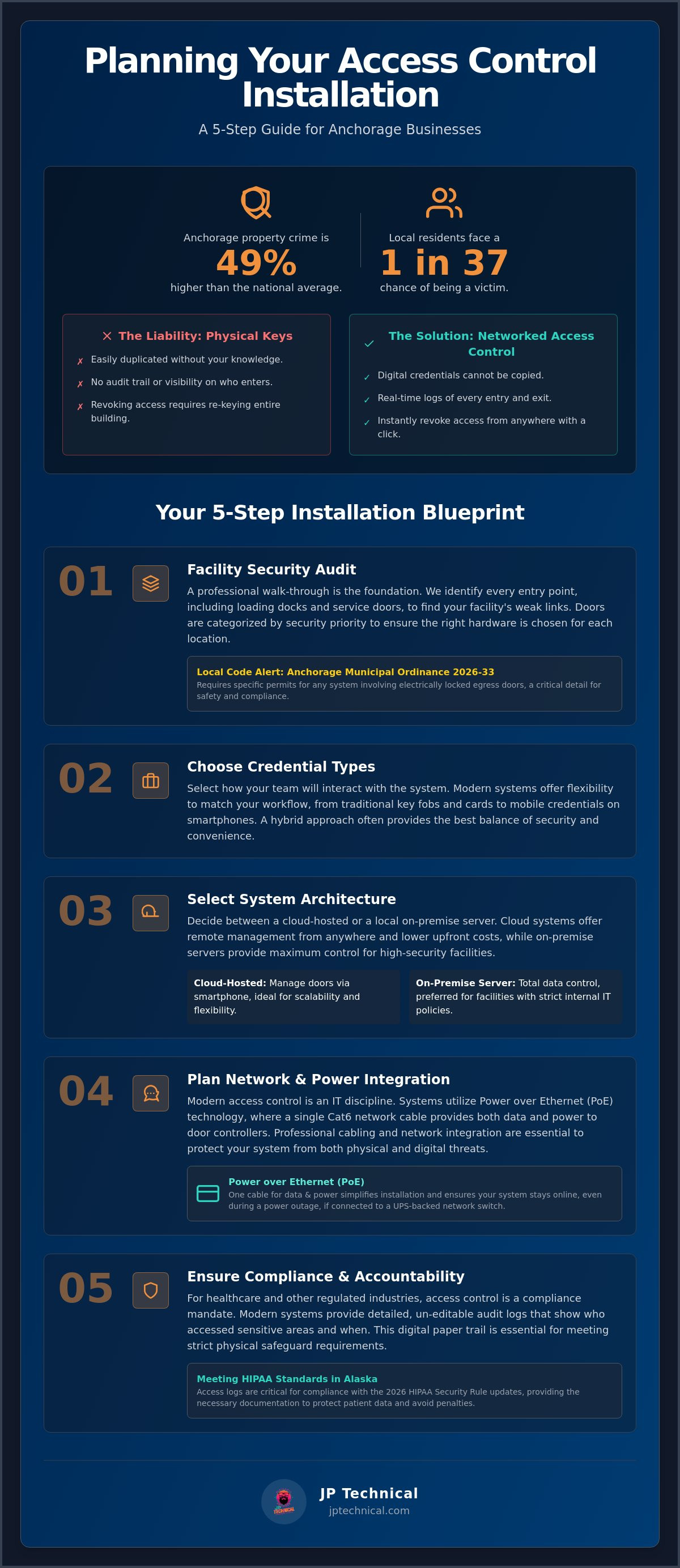
With Anchorage property crime rates sitting 49% higher than the national average, a simple brass key is no longer enough to protect your livelihood. Local residents face a 1 in 37 chance of being a victim of property crime each year. If you’re still managing a heavy ring of physical keys, you’ve likely felt the frustration of unreturned hardware or the anxiety of not knowing exactly who entered your building after hours. Planning an access control installation in Anchorage is no longer just about locking doors; it’s about integrating your physical security with your digital network to stay ahead of both local threats and evolving regulations like the 2026 HIPAA Security Rule updates.
You deserve a system that works as hard as you do without adding technical headaches to your daily operations. This guide provides a clear, step-by-step path for Anchorage business owners to move from outdated locks to secure, networked systems. We’ll walk through the latest 2026 municipal building codes, hardware selection, and how to integrate your entry points with your existing IT infrastructure. By the end, you’ll have a roadmap to a more secure facility and the peace of mind that comes from professional, local oversight.
Key Takeaways
Learn why physical master keys are a liability and how networked systems eliminate the security risks of unreturned hardware.
Discover the essential five-step planning process for a successful access control installation in Anchorage, beginning with a professional site audit.
Understand the critical differences between cloud-hosted and local server systems to choose the right scalability for your business.
See how professional PoE cabling and network integration protect your entry system from both physical and digital intrusions.
Find out how modern access logs help you meet strict HIPAA physical safeguard requirements and maintain accountability for sensitive areas.
Table of Contents
Modern Access Control: Moving Beyond Physical Keys in Anchorage
How to Plan Your Access Control Installation: A 5-Step Process
Comparing Access Technologies: Which System Fits Your Business?
Modern Access Control: Moving Beyond Physical Keys in Anchorage
Modern Access Control systems represent a fundamental shift in how local businesses protect their assets. Unlike a standard lock, a networked system combines specialized hardware, management software, and digital credentials to create a comprehensive security perimeter. When you invest in an access control installation Anchorage professionals can trust, you aren’t just buying a lock; you’re gaining a digital paper trail. Every entry and exit is recorded in real-time, providing an audit log that physical keys simply can’t offer. This visibility is essential for business owners who need to know exactly who was in the building at 2:00 AM on a Tuesday.
In 2026, we’re seeing a decisive move toward cloud-based management. While some high-security facilities still prefer on-premise servers, cloud-hosted systems allow you to manage your doors from a smartphone anywhere in Alaska. If an employee leaves the company, you can revoke their access instantly with a single click. This level of control is the standard for modern physical security, ensuring that your facility remains protected without the delay of manual lock changes.
The Hidden Costs of Traditional Lock-and-Key Systems
Physical keys are a major liability for Anchorage businesses. If an employee loses a master key, the cost of re-keying every exterior and interior door is significant. Beyond the expense, there’s the logistical headache of distributing new keys to your entire staff. Traditional keys lack the flexibility required for a fast-moving business. Consider these common vulnerabilities:
Unauthorized Duplication: Standard keys are easily copied at local hardware stores without your knowledge.
Zero Visibility: You can’t track who entered a specific room or what time they arrived.
Delayed Revocation: You can’t deactivate a physical key instantly; you must physically retrieve it or change the locks.
A physical key is a “dumb” device. It doesn’t know if the person holding it is authorized to be there today or if their employment ended yesterday. This gap in security is exactly what a networked system closes.
Why Access Control is Now an IT Responsibility
Modern security has moved from the locksmith’s toolbox to the IT server rack. Most access control installation Anchorage projects now utilize Power over Ethernet (PoE) technology. This means your door controllers receive both power and data through a single Cat6 cable connected to your network switch. Because these systems live on your network, they can integrate directly with your employee directories like Google Workspace or Active Directory. When you add a new hire to your network, their door access can be provisioned automatically. This convergence of IT and physical security ensures that your entry points are as secure as your digital firewalls, maintained by experts who understand network integrity.
How to Plan Your Access Control Installation: A 5-Step Process
Planning is the most critical phase of any security project. A rushed decision often leads to expensive hardware that doesn’t fit your daily workflow or fails to meet local safety codes. Before you purchase a single card reader, you need a structured approach that considers both your physical layout and your digital network. Following a methodical 5-step process ensures your access control installation Anchorage project provides long-term reliability and real protection for your staff.
Step 1: The Facility Security Audit
Success begins with a thorough walk-through of your property. You must identify every entry and exit point, including those often overlooked like loading docks or side service doors. In Anchorage industrial zones, back alleys and delivery bays are frequent weak links that require specific attention. Your audit should categorize doors by traffic volume and security priority. For example, a main lobby needs high-durability hardware, while a server room requires stricter credential verification to meet HIPAA Standards in Alaska. Additionally, you must account for Anchorage Municipal Ordinance 2026-33, which requires specific permits for any system that involves electrically locked egress doors.
Step 2: Choosing Your Credential Type
How your employees interact with the door determines the system’s convenience and security level. You aren’t limited to just one type; many modern systems allow a mix of credentials based on the door’s location. Consider these three primary options:
RFID Badges: These remain the industry standard. They’re durable, cost-effective, and easy to issue to temporary contractors or new hires.
Mobile Access: This allows staff to use their smartphones as keys. It’s highly convenient and eliminates the problem of forgotten badges, as most people rarely leave their phones behind.
Biometrics: Fingerprint or facial recognition technology is ideal for high-security areas. It ensures that the person entering is exactly who they claim to be, providing the highest level of identity verification.
Once you’ve selected your credentials, the remaining steps focus on the technical and logistical implementation. Step 3 involves evaluating your network infrastructure to ensure your Cat6 cabling and PoE switches can handle the new controllers. Step 4 is the creation of user access levels, where you define exactly who can enter specific zones and during what hours. Finally, Step 5 is selecting a local partner who understands the unique challenges of the Alaska environment and can provide ongoing support. If you’re unsure where your current infrastructure stands, a professional IT assessment can help identify potential network gaps before you begin your installation.
Comparing Access Technologies: Which System Fits Your Business?
Choosing the right technology for an access control installation Anchorage project requires balancing immediate security needs with future scalability. Not all systems are built for the same environment. A small retail shop has different requirements than a multi-floor medical office or a secure warehouse in the industrial district. Understanding the technical differences between standalone and networked systems is the first step toward a reliable solution.
Standalone systems are independent locks that don’t communicate with a central server. They’re often cheaper upfront but require manual management at each door. If an employee leaves, you must physically visit every lock to revoke their access. Networked systems connect every entry point to a central management interface. This setup allows for instant, site-wide updates and detailed audit logs. In 2026, networked systems are the standard for businesses that value time and security.
Alaska’s climate adds another layer of complexity. Standard outdoor readers often fail when temperatures drop below zero or when ice buildup interferes with mechanical strikes. For any access control installation Anchorage business owners should ensure their hardware is rated for extreme cold. This often requires specialized heater kits or IP67-rated weatherproofing to maintain continuity through the winter months. If your hardware isn’t built for the sub-arctic, your security perimeter will eventually fail when you need it most.
Cloud-Based Access Control Pros and Cons
Cloud-hosted systems have gained significant ground because they remove the need for a dedicated on-site server. This reduces upfront hardware costs and shifts the burden of maintenance to the provider. The primary benefits include:
Remote Management: You can manage multiple Anchorage locations from a single web dashboard or mobile app.
Automatic Updates: The software stays current with the latest security patches without manual intervention.
Predictable Costs: Subscription-based models help with budgeting for long-term support.
The main consideration is your internet stability. If your facility is in a remote area with spotty connectivity, a local server might be a safer choice. This ensures doors still operate correctly even if the external network goes down.
Integrating Surveillance with Access Logs
The true power of modern security lies in integration. When you connect your door controllers to your camera system, you gain video verification. This means every time a badge is swiped, your system can automatically bookmark the corresponding video footage. If an unauthorized entry occurs, you don’t have to scrub through hours of tape. You simply click the access log to see the person who used the credential. You can also automate alerts for events like “door propped open,” which triggers a nearby camera to zoom in and notify your team. To see how these technologies work together, explore our Physical Security & Surveillance solutions.
The Technical Side: Installation and Network Integration
A successful access control installation Anchorage relies on more than just high-end hardware. It depends on the invisible infrastructure behind the scenes. In 2026, door controllers are sophisticated network devices that require high-speed data transfer and consistent power. Professional Cat6 cabling is the backbone of this setup. Using Power over Ethernet (PoE) allows your controllers to draw power directly from your network switches, reducing the need for complex electrical work at every doorway. This streamlined approach ensures your system is both cleaner and easier to maintain over the long term.
Security also means preparing for the unexpected. Anchorage’s local power grid can experience fluctuations, especially during heavy winter storms. Without a dedicated battery backup, a power flicker could reset your controllers or leave doors in an insecure state. We prioritize installing Uninterruptible Power Supplies (UPS) that keep your security perimeter active even when the lights go out. Once the physical components are in place, the commissioning phase begins. This involves testing every reader, door contact, and request-to-exit sensor to ensure the software logic matches your real-world needs.
Cybersecurity for Physical Security
When you put your locks on the network, you must protect them like any other server or workstation. Poorly configured access systems can become a “backdoor” for hackers to enter your business network. To prevent this, we segment your security hardware onto a separate Virtual Local Area Network (VLAN). This isolation ensures that even if a reader is tampered with, your sensitive business data remains unreachable. We also implement strong encryption between the reader and the controller to stop credential cloning. Perhaps most importantly, we replace all default manufacturer passwords immediately. Leaving a default password active is the most common vulnerability in modern installations, and it’s a risk we never take.
Local Maintenance and Support
Technology is only as good as the team standing behind it. When a door fails to unlock at 8:00 AM on a Monday, you need a partner who can arrive on-site quickly. Remote support is helpful for software tweaks, but physical hardware issues require local expertise. Beyond emergency repairs, we focus on proactive care through scheduled firmware updates. These updates are vital to patch newly discovered hardware vulnerabilities and keep your system running smoothly. If you’re concerned about how your current network would handle a new security system, you can request a Free IT and Security Assessment to evaluate your infrastructure before you begin.
Compliance and Peace of Mind: HIPAA Standards in Alaska
Compliance in the Alaska business environment is becoming more complex, especially for healthcare providers and firms handling sensitive data. The 2026 updates to the HIPAA Security Rule have shifted several previously “addressable” safeguards into the mandatory category. This means you must have documented proof of who enters areas containing Protected Health Information (PHI) or critical server infrastructure. A professional access control installation Anchorage healthcare facilities implement provides the necessary audit trails to meet these strict federal requirements and the broader data protections under the Alaska Personal Information Protection Act (APIPA).
Beyond daily compliance, your system should act as a silent guardian during emergencies. Modern controllers allow for automated “lockdown” procedures that can be triggered instantly from a central dashboard. With a single command, you can secure every exterior door while still allowing for safe emergency egress as required by local fire codes. This capability provides a level of predictability and control that physical keys simply can’t match during a crisis. It’s about building a facility that’s inherently resilient against both local property crime and regulatory scrutiny.
HIPAA Physical Safeguards for Medical Offices
Restricting access to server rooms and file storage is a foundational requirement under the HIPAA Security Rule. You can’t just lock the door; you must ensure that only authorized personnel have the credentials to enter. Our systems use unique user identifiers for every staff member. This ensures that every entry event is tied to a specific individual rather than a generic, shared key. This level of granularity is essential for maintaining an accurate access log for any area housing sensitive patient data. You can review our HIPAA Compliance Services to see how we align your physical security with your digital privacy obligations.
The Value of a Single Security Partner
Many businesses struggle with “vendor friction” when their security installer doesn’t understand their network and their IT provider doesn’t handle door hardware. We eliminate this gap by serving as your single point of contact for both managed IT and physical security. This integrated approach leads to more predictable budgeting and faster troubleshooting. Whether you’re in Anchorage, Wasilla, or the surrounding areas, having one local partner who understands the full scope of your technology stack ensures long-term stability. You can refer to our Managed IT Services in Anchorage guide to see how physical security fits into the broader picture of business continuity.
Securing Your Anchorage Business for the Future
Transitioning to a modern entry system is a definitive step toward protecting both your physical and digital assets. By replacing vulnerable brass keys with networked credentials, you gain real-time visibility and the ability to manage your facility from any location. A properly planned access control installation Anchorage professionals manage ensures you remain compliant with evolving 2026 HIPAA regulations while providing a safer environment for your staff. This shift turns your security from a reactive hardware cost into a proactive IT asset.
Since 1996, we’ve served as a local guardian for businesses throughout Alaska. Our team consists of HIPAA-certified security specialists who understand that physical locks are now a vital part of your network infrastructure. We provide steady, reliable support for partners in Anchorage, Wasilla, Kenai, and Fairbanks, ensuring your systems remain operational through every winter storm. We’re here to handle the technical complexity so you can focus on your daily operations with confidence.
Secure your premises today with a professional Access Control Assessment from JP Technical.
Taking control of your security is a manageable process when you have the right guide. We look forward to helping you build a safer, more predictable future for your business.
Frequently Asked Questions
How much does access control installation cost in Anchorage?
Costs depend on the number of doors and the specific hardware chosen for your facility. Factors such as the type of credential used and the existing state of your network cabling will impact the total investment. Because every building has unique structural requirements, we recommend a site walk-through to determine the most effective path for your upgrade. This allows us to provide a quote that reflects your specific security needs.
Can I use my smartphone to unlock my office doors?
Yes, modern mobile-ready systems allow you to use your smartphone as a digital key. These systems use Bluetooth or NFC technology to communicate with the reader securely. This provides a high level of convenience for staff and allows administrators to issue or revoke credentials instantly. It’s an ideal solution for businesses looking to eliminate the costs and risks associated with physical badges or cards.
What happens to the locks if the power goes out or the internet is down?
Most commercial systems include local battery backups that keep the door controllers active during power fluctuations. If the internet goes down, networked controllers typically store access permissions locally. This ensures that authorized employees can still enter the building even if the connection to the cloud is temporarily lost. Once the connection is restored, the system automatically syncs the entry logs to your central dashboard.
Is it possible to integrate my existing security cameras with a new access system?
Integration is possible if your cameras and access system support common industry standards. Connecting these systems allows for video verification, where swiping a badge triggers a camera to record the event. This creates a more robust security environment by pairing entry logs with visual evidence. It’s a powerful tool for investigating unauthorized access attempts or verifying that the correct person used a specific credential.
Do I need to replace my actual doors to install an electronic system?
You rarely need to replace your entire door to upgrade your security. Most installations involve adding electronic strikes or magnetic locks to your existing frames. If your current doors are in good structural condition, we can usually retrofit them with the necessary hardware. We’ll evaluate your door hardware during the initial site audit to confirm compatibility and ensure the installation meets all local fire codes.
How long does a typical installation take for a small Anchorage office?
A standard installation for a small office with two to four doors usually takes two to three days. This timeline includes the physical hardware mounting, Cat6 cabling, and software configuration. Larger facilities or those requiring complex network integration will take longer, but we provide a clear schedule before the work begins. Our goal is to minimize disruption to your daily operations during the transition.
Can I manage multiple office locations from one app?
Yes, cloud-based access control systems allow you to manage multiple sites from a single dashboard. Whether your offices are in Anchorage, Wasilla, or Fairbanks, you can control every door and review every audit log from one application. This centralized management simplifies administration for growing Alaska businesses. You can update access levels for all locations simultaneously without needing to be physically present at each site.
Is access control required for HIPAA compliance in Alaska?
While the HIPAA Security Rule doesn’t mandate a specific brand of technology, it does require covered entities to implement physical safeguards. An access control installation Anchorage providers use is the industry standard for meeting these rules. It ensures that access to sensitive areas is limited to authorized staff and provides the electronic logs required during a compliance audit. It’s the most reliable way to prove your facility is secure.
 Article by
Colter Hobbs