Managed Software Updates for Business: The 2026 Guide to Stability and Security
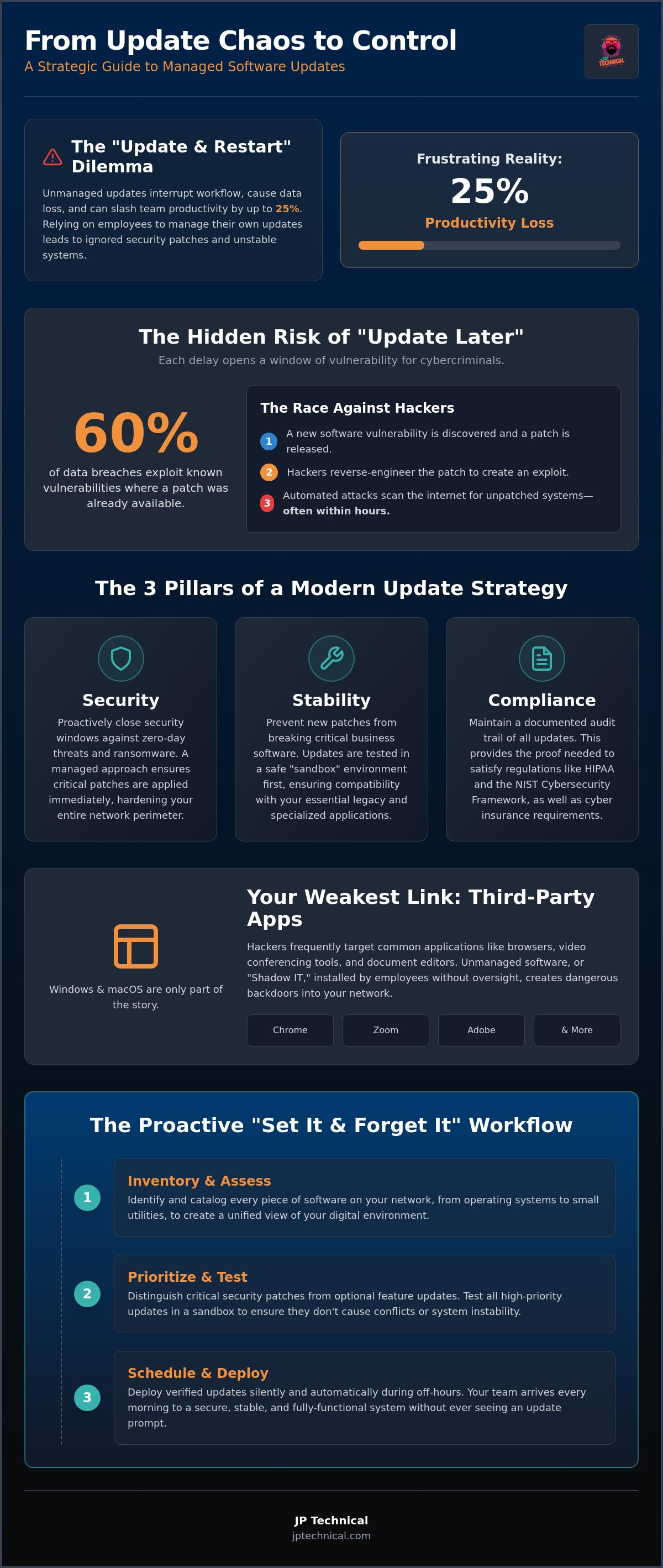
Imagine your top performer is finishing a critical report when their screen suddenly turns blue with a “Configuring Updates” message, erasing an hour of unsaved progress. It’s a frustrating reality that can slash business productivity by up to 25%. While it’s tempting to let employees manage their own prompts, this manual approach often leads to ignored security patches or broken workflows. Strategic managed software updates for business transform this technical chore into a silent, reliable shield that works in the background.
You probably feel the tension between needing the latest security and fearing that a new patch will crash your essential software. We understand that you need stability, not more technical noise. This guide will show you how to eliminate “Update and Restart” interruptions forever while maintaining 100% compliance with standards like HIPAA and the NIST Cybersecurity Framework 2.0. We’ll walk through a “set it and forget it” strategy that ensures your systems stay stable, secure, and ready for work every single morning.
Key Takeaways
Learn how managed software updates for business replace reactive clicking with a strategic, automated pipeline for better operational continuity.
Understand the risks of the “Update Later” habit and how to close the security windows that invite ransomware into your network.
Discover why testing updates in a sandbox environment prevents new patches from breaking your critical or legacy software.
Gain a clear framework for inventorying your systems and prioritizing essential security fixes over optional feature updates.
See how a proactive maintenance approach eliminates productivity-killing restarts and ensures your team stays focused on their work.
Table of Contents
What are Managed Software Updates for Business?
Think of your company’s digital environment as a well-maintained property. If you wait for a leak to fix the roof, you’re already too late. Managed software updates for business represent the systematic control of software versions to ensure security and compatibility. This proactive IT strategy moves away from the “Update Later” button and toward a centralized system where every patch is tested, scheduled, and deployed without employee intervention.
The “managed” aspect makes all the difference. In the past, IT was often reactive. You clicked a button when a prompt appeared. Today, that approach is a liability. A strategic, automated pipeline ensures that every device on your network follows the same rules. This creates a predictable environment where security is the default setting, not an optional task for your busy staff. By centralizing this patch management process, you remove the burden from your team and place it in the hands of specialists who verify each update before it reaches your workstations.
The Three Pillars of Update Management
A reliable update strategy rests on three specific foundations. First is Security. With the rise of “Zero-Day” vulnerabilities, the window to protect your data is shrinking. If a patch isn’t applied immediately, your business is exposed. Second is Stability. We’ve all seen a Windows update break a specialized accounting or CAD program. Testing updates in a “sandbox” first ensures that your industry-specific tools keep running. Finally, there is Compliance. Regulations like HIPAA and the NIST Cybersecurity Framework 2.0, which was updated in 2026 to emphasize governance, require documented proof that your systems are current. Managed updates provide the audit trail you need to stay compliant.
Beyond the Operating System
Many business owners focus solely on Windows or macOS updates, but the real danger often hides in third-party applications. Apps like Chrome, Zoom, and Adobe are frequent targets for hackers. If these aren’t managed centrally, they become the weakest link in your defense. Unmanaged software, often called “shadow IT,” can creep onto company devices when employees download tools without oversight. A managed service provides a unified view of your entire software inventory. It identifies every application running on your network and ensures that even the smallest utility is patched and secure. This level of visibility is the only way to maintain a truly hardened perimeter in 2026.
The Hidden Risks of the “Update Later” Culture
Every time an employee clicks “Remind me tomorrow” on an update prompt, they’re opening a window for potential disaster. This “Update Later” culture is one of the most significant hidden risks in modern offices. While the prompt seems like a minor annoyance, delaying it creates a vulnerability that hackers are eager to exploit. Beyond the security threat, there’s a tangible productivity cost. We’ve all seen a critical system force a restart in the middle of a client meeting or a high-stakes presentation. These interruptions are unprofessional and entirely preventable with managed software updates for business.
The numbers back this up. Industry data suggests that roughly 60% of all data breaches exploit known vulnerabilities where a patch was already available but had not been installed. This isn’t just a technical oversight; it’s a fundamental gap in your company’s defensive perimeter. For official guidance on building a stronger defense, the FTC provides a helpful resource on Cybersecurity for Small Business.
Ransomware and the Unpatched Gateway
Cybercriminals don’t guess where your weaknesses are. They use public vulnerability databases to identify exactly which software versions have “holes” they can crawl through. Once a developer releases a patch, hackers immediately reverse-engineer it to find the exploit. They then scan the internet for businesses that haven’t updated yet. The timeline from a patch release to an active attack is now measured in hours, not days. Consider a local firm that ignored a routine server update for two weeks. During that window, a ransomware strain entered through that unpatched gateway, encrypted their entire client database, and halted operations for six days. A systematic approach to updates would have closed that door before the hackers even arrived.
Compliance Failures and Legal Liability
Staying current is also a matter of staying legal. If your business handles sensitive data, unmanaged updates can lead to severe consequences. Many cyber insurance providers now require proof of a consistent patching schedule to honor a claim. If you suffer a breach and haven’t kept up with updates, your policy might be voided. This is especially critical for HIPAA compliance, where protecting patient privacy is a legal mandate. In a courtroom or an audit, “I didn’t know the update was important” isn’t a valid defense. Professional oversight ensures you have the documentation and the protection needed to satisfy both regulators and insurers. If you’re concerned about your current coverage, you can request a free IT assessment to identify any lingering gaps.
Auto-Updates vs. Managed Updates: The Reliability Gap
Relying on “Auto-Update” settings might seem like an easy way to stay current, but for a professional office, it is often a gamble. Consumer-grade automation is designed for simplicity, not for the complex interdependencies of business software. When an update installs itself autonomously, it doesn’t check if your legacy accounting software or custom inventory tool is compatible. It simply executes. This can lead to the “blue screen” errors or software hangs that bring your morning to a screeching halt. In contrast, managed software updates for business provide a deliberate, human-verified layer of protection between the software developer and your workstations.
The primary difference lies in control. Auto-updates follow the developer’s timeline, which often results in restarts at 10 AM on a Tuesday. Managed updates allow us to dictate the “when” and “how.” We schedule deployments for 2 AM or over the weekend, ensuring your team arrives to a system that is already updated and ready for work. If a specific patch is known to be buggy, we can block it entirely until a fix is released. This level of oversight turns IT maintenance from a source of chaos into a predictable, background process.
Every strategy needs a safety net. If a vetted update causes an unforeseen conflict after deployment, a managed system allows for an immediate “rollback.” We can revert the affected machines to their previous stable state in minutes. Without this capability, your only option is often a time-consuming manual repair or a full system restore. This proactive approach ensures that even when technology fails, your downtime remains minimal.
The Sandbox: Testing Before Deploying
We don’t believe in using your live environment as a testing ground. At JP Technical, we utilize a “sandbox” to verify that a new Windows patch won’t break your line-of-business apps before it ever touches your network. We also utilize phased rollouts, deploying updates to a small group of non-critical machines first. If those systems remain stable for 24 to 48 hours, we proceed with the rest of the office. This methodical process ensures hardware compatibility and software stability across your entire fleet.
Bandwidth Management for Alaskan Businesses
Offices in Wasilla, Kenai, or remote parts of the state often face unique connectivity hurdles. A single major update can be several gigabytes in size. If twenty computers try to download that file simultaneously, your office internet will crawl to a halt. Our managed systems solve this by distributing updates locally. One machine downloads the patch and then shares it with the others on the local network. This prevents network “choke points” and keeps your bandwidth free for actual business operations. If you’re unsure if your network can handle the load, a free IT assessment can help clarify your needs.
Building a Modern Update Strategy for Your Team
Effective managed software updates for business start with a clear view of your network. You cannot manage what you do not track. This means maintaining a live inventory of every laptop, desktop, and server under your roof. Once you have visibility, you must distinguish between “Critical Security” patches and “Feature Enhancements.” While a new interface for a PDF reader is nice, a patch for a remote code execution vulnerability is mandatory. We prioritize the latter to ensure your perimeter remains hardened while deferring non-essential changes that could disrupt your workflow.
Communication is the often-overlooked bridge in this process. Employees are more likely to support IT initiatives when they aren’t caught by surprise. We recommend telling your team exactly when updates will occur. When they know their systems are being cared for at 2 AM, it builds trust and reduces the temptation to bypass security settings. Finally, you need detailed reporting. Maintaining a log of every successful patch is essential for regulatory audits and for satisfying the requirements of your cyber insurance provider. If you’re ready to stop guessing about your network’s health, schedule a free IT assessment today to see where you stand.
The 5-Step Update Lifecycle
We follow a methodical approach to ensure nothing is left to chance. This lifecycle includes:
Step 1: Discovery. We perform a full inventory of all hardware and software.
Step 2: Monitoring. Our team watches for new patches and security bulletins 24/7.
Step 3: Testing. We validate updates in a controlled environment to catch bugs early.
Step 4: Deployment. We schedule the rollout during low-impact hours to prevent downtime.
Step 5: Verification. We confirm the update was successful and remediate any failed installs immediately.
Integrating with Your Disaster Recovery Plan
Even with rigorous testing, the unexpected can happen. This is why a verified backup should always precede a major operating system update. Our disaster recovery services act as the ultimate safety net for your operations. If an update causes a rare but critical system failure, we don’t just troubleshoot; we restore. We utilize “immutable backups” before system-wide changes, ensuring that your data remains untouched and recoverable regardless of the update’s outcome. This combination of proactive patching and resilient recovery is what keeps a business stable under pressure.
Why Anchorage Businesses Trust JP Technical for IT Maintenance
In Alaska, business owners value a straight-shooter who knows the local landscape. When you partner with us, you aren’t just getting another software vendor; you’re gaining a neighborly guardian. We understand the unique connectivity hurdles in the North, from Anchorage to Fairbanks. Our approach to managed software updates for business is built on this local accountability. We monitor your systems 24/7, providing a level of vigilance that distant, automated services simply can’t match. This proactive care ensures that your network remains a tool for growth, not a source of anxiety.
Our commitment to proactive IT maintenance keeps your team focused on their actual work. By utilizing managed software updates for business, we handle the vetting and deployment of critical patches quietly in the background. This is especially vital for healthcare providers who must maintain HIPAA-compliant solutions. Whether you’re a clinic in Fairbanks or a law firm in downtown Anchorage, we provide the steady reliability you need to meet regulatory standards without sacrificing daily productivity.
Local Accountability vs. Distant Vendors
If an update goes wrong, you don’t want to wait on a hold line for a technician in a different time zone. Having a team right here in Anchorage matters. We apply a no-nonsense work ethic to your cybersecurity, showing up when things get difficult. We act as your dedicated ally, ensuring that your specific hardware and software configurations are respected during every patch cycle. This human connection is the foundation of a long-term partnership that values your business’s continuity above all else.
Next Steps: Securing Your Operations
Taking control of your IT environment doesn’t have to be overwhelming. You can start with a Free IT Assessment to identify any hidden vulnerabilities in your current setup. We also offer transparent pricing for our managed services, so you know exactly what to expect without high-pressure sales tactics. Contact our team today to stop worrying about the “Update” pop-up and start enjoying the peace of mind that comes with professional oversight.
Securing Your Operational Future
Relying on manual prompts or unverified auto-updates is no longer a viable strategy for a growing company. By implementing managed software updates for business, you close the security gaps that hackers exploit and eliminate the midday restarts that frustrate your staff. This systematic approach ensures your network remains stable, compliant, and ready for the challenges of 2026. It’s about moving from a state of technical anxiety to one of predictable continuity.
JP Technical has been a trusted ally for Alaska businesses since 1996. As HIPAA-compliant specialists with a local, Anchorage-based support team, we understand how to protect your operations while you focus on your goals. We’re here to act as your seasoned guardians, handling the complexities of IT maintenance so you don’t have to. Take the first step toward a more resilient network today.
Secure your business with a Free IT Assessment from JP Technical
Your team deserves a digital environment that works as hard as they do. We look forward to helping you build a more secure and stable foundation for your business.
Frequently Asked Questions
What is the difference between patch management and software updates?
Software updates are the individual code releases provided by developers; patch management is the professional strategy used to oversee those releases. While an update fixes a specific bug or adds a feature, patch management involves the testing, scheduling, and verification of those changes across your entire network. managed software updates for business provide the centralized control needed to ensure these fixes don’t conflict with your existing tools.
Can managed software updates be done for remote employees outside of Anchorage?
Yes, our team can manage updates for remote employees anywhere with an active internet connection. We use cloud-based management agents that allow us to monitor and secure devices whether they are in an Anchorage office or a home in Fairbanks. This ensures that your company data remains protected by the same security standards, regardless of where your staff chooses to work.
How do managed updates help with HIPAA compliance for my medical practice?
HIPAA regulations require healthcare providers to maintain technical safeguards that protect electronic protected health information. Regular patching is a fundamental part of this requirement because it closes vulnerabilities that could lead to a data breach. Our managed service provides the detailed reporting and audit trails necessary to prove your practice is staying current with all security mandates during a regulatory review.
Will managed updates slow down my computers or my internet speed?
Professional update management actually protects your speed by preventing the “update choke” that happens when multiple machines download large files at once. We schedule deployments for the middle of the night and use local distribution technology to save bandwidth. This ensures your computers stay fast and your internet remains clear for business operations during your actual working hours.
What happens if a managed update breaks a critical piece of software we use?
We minimize this risk by testing patches in a controlled sandbox environment before they ever touch your production systems. If a conflict does occur despite testing, our management tools allow for an immediate rollback to the previous stable state. This is a significant advantage over consumer auto-updates, which often leave you with a broken system and no easy way to revert.
Is it really necessary for a small business with only five computers to have managed updates?
Cybercriminals often target smaller firms because they assume those businesses have fewer defenses in place. Even with only five computers, a single unpatched vulnerability can lead to a total loss of data or a costly ransomware event. Implementing managed software updates for business provides your small team with the same level of protective vigilance used by much larger organizations at a fraction of the cost.
How often should software updates be performed for a business?
Security patches for critical vulnerabilities should be deployed as soon as they are tested and verified, which we often do within 24 hours. General feature updates and non-essential changes are usually handled on a weekly or monthly schedule. This methodical cadence ensures that your systems stay protected against the latest threats without causing constant interruptions to your team’s daily productivity.
Can I exclude certain mission-critical servers from automatic updates?
You can certainly exclude specific servers from automated cycles if they require a higher level of manual oversight. We can create custom policies that allow us to perform “high-touch” updates on mission-critical systems during your specific maintenance windows. This ensures that your most important assets are updated under the direct supervision of a technician, preventing any unexpected service interruptions.
 Article by
Colter Hobbs