Patch Management for Small Business: A Practical 2026 Security Guide
It is 2:00 PM on a Tuesday, and every computer in your office just forced a restart for a “critical” update you didn’t see coming. Work stops, frustration peaks, and you’re left wondering if this update will actually fix a security hole or just crash your server. You know that keeping software current is vital for your safety, but the constant interruptions and the fear of system downtime make it feel like a chore you’d rather ignore. Effective patch management Anchorage businesses can rely on shouldn’t feel like a gamble with your daily productivity.
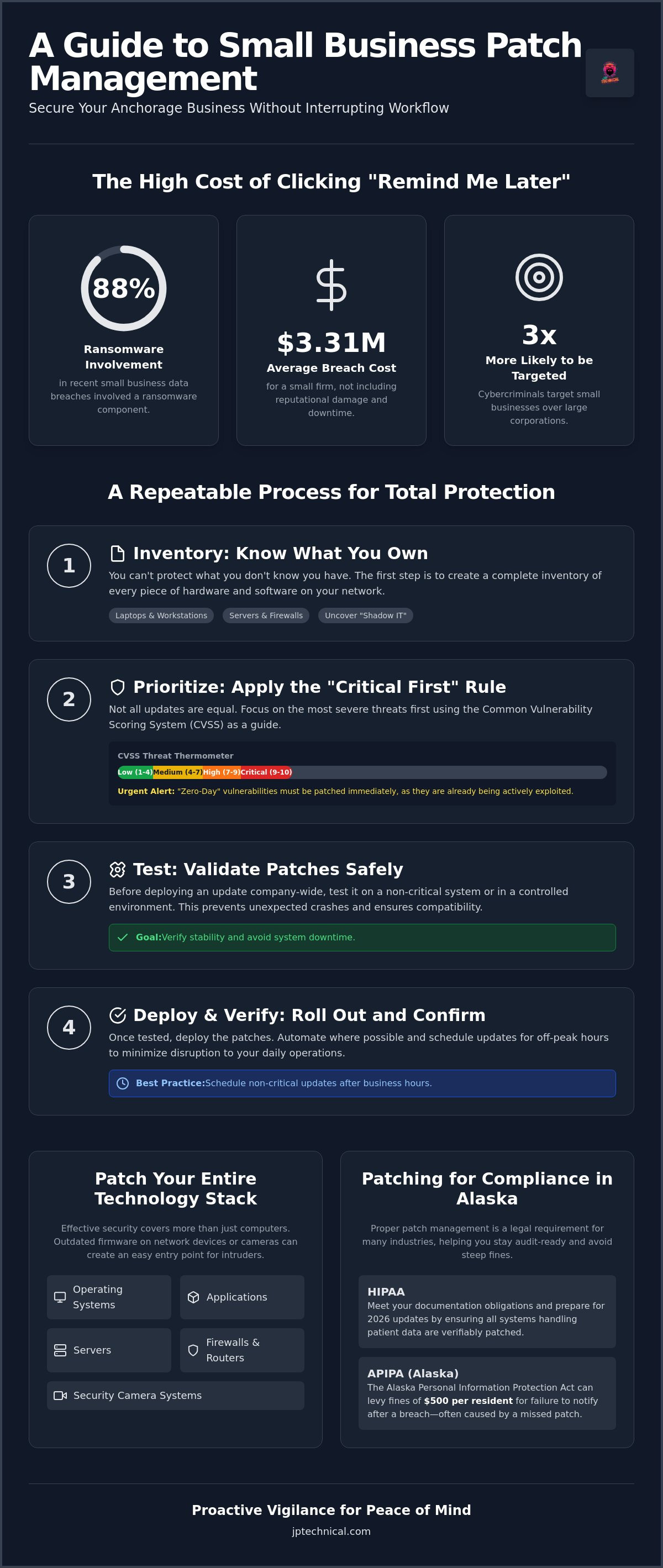
We believe that security should work quietly in the background so you can focus on your clients. This guide shows you how to implement a stress-free process that secures your network without breaking your workflow. We’ll explore how to navigate 2026 HIPAA updates and APIPA requirements while addressing the reality that 88% of small business breaches now involve a ransomware component. You will learn to move from a reactive approach to a steady rhythm of vigilance that provides peace of mind and keeps your business compliant in an era where the average cost of a breach for a small firm has reached $3.31 million.
Key Takeaways
Learn how to build a comprehensive asset inventory so you can protect every device and piece of software on your network.
Discover the “risk-based” approach to prioritizing critical server and firewall updates over less sensitive workstations.
Find the ideal balance between automation and manual oversight to implement patch management Anchorage businesses can rely on for both security and stability.
Understand your documentation obligations under HIPAA and Alaska state laws to ensure your business remains compliant and audit-ready.
See how a local partnership provides the proactive vigilance needed to manage complex updates in the background while you focus on daily operations.
Table of Contents
What is Patch Management and Why Does Your Small Business Need It?
What is patch management at its core? It is the systematic process of identifying, testing, and installing updates for your software and hardware. Think of these updates as digital repairs for “holes” or vulnerabilities in your armor. While feature updates add new tools and bug fixes improve stability, security patches are the most critical. They close the specific entry points that hackers use to infiltrate your network. Without a plan to manage these updates, your business remains exposed to threats that are often fixed months ago by the software developers.
In Anchorage, many business owners believe they are too small to be a target. This is a dangerous “Silent Risk.” Small businesses are actually three times more likely to be targeted by cybercriminals than large corporations. Hackers know that smaller teams often lack dedicated IT staff, which makes their systems easier to exploit. By implementing professional patch management Anchorage firms can ensure they aren’t leaving the digital back door unlocked. Proactive care is always more cost-effective than reactive recovery.
The threat landscape in 2026 has shifted toward speed and automation. AI-powered malware now scans the internet for vulnerabilities within hours of a software fix being released. If you wait days or weeks to apply an update, you’re falling behind a machine-speed threat. It’s no longer enough to update once a month; security requires a steady rhythm of vigilance to stay ahead of these automated exploits.
The Real Cost of “Remind Me Later”
Clicking “remind me later” on a Windows update might seem like a way to stay productive, but it’s a high-stakes gamble. A single missed patch can lead to ransomware, which was involved in 88% of small business data breaches recently. Beyond the immediate ransom demand, consider the legal fallout. Under the Alaska Personal Information Protection Act (APIPA), failing to notify residents of a breach can lead to fines of $500 per resident. When you add the cost of total system downtime and a damaged reputation in our local community, that “free” update becomes your most valuable asset.
Software vs. Firmware: What Needs Patching?
Effective security covers your entire technology stack. It’s not just about your laptop’s operating system. You must also update the firmware on your routers and firewalls to keep your perimeter secure. This extends to your security camera systems as well. Modern cameras are networked devices; if their software is outdated, they become an easy entry point for intruders. Don’t forget common applications like Zoom, Adobe, and web browsers. These are often the most frequently exploited tools in a standard office environment. Comprehensive patch management Anchorage services ensure that every device, from the server in the closet to the camera on the wall, stays protected.
How to Build a Small Business Patch Management Process
Building a reliable security posture starts with a repeatable plan. Without a structured process, the patch management Anchorage businesses attempt often becomes an inconsistent series of “remind me later” clicks that leave systems exposed. A professional approach follows four distinct steps to ensure nothing is missed. This methodical rhythm turns a complex technical burden into a predictable part of your operations.
Inventory: Tracking Every Device in Your Office
You can’t protect what you don’t know you own. Asset discovery is the foundation of any security audit. This process involves logging every laptop, tablet, and workstation across your Anchorage or Wasilla locations. It also includes identifying “Shadow IT,” which refers to applications or cloud services employees might have installed without official approval. These unmonitored tools often create unpatched backdoors that bypass your primary security settings. Keeping a clean, updated list of hardware and software ensures that no device is left behind during a maintenance cycle.
Prioritization: The “Critical First” Rule
Not all updates are equal. We recommend using the Common Vulnerability Scoring System (CVSS) as a guide. Think of this as a “threat thermometer” that ranks vulnerabilities from 1 to 10 based on their severity. A score of 9 or 10 on your firewall or main server requires immediate attention. If a “Zero-Day” vulnerability is announced, you must act immediately regardless of your usual schedule. Hackers are already actively using those exploits, so waiting even 24 hours can be a significant risk. You must balance this urgency with the need for system stability; testing a patch on one machine before rolling it out to the whole office can prevent a “bad patch” from causing total downtime.
Once you’ve prioritized your risks, the next steps involve scheduling and verification:
Step 3: Establish a Patching Schedule. Consistency reduces anxiety. Create a maintenance window outside of your peak business hours to avoid interrupting your team’s workflow. If you operate a standard 9-to-5, a Tuesday or Wednesday evening window often works well. This allows you to address any unexpected issues before the next morning’s rush.
Step 4: Execute and Verify. The job isn’t done just because the progress bar reached 100%. You must confirm the update installed correctly and that your critical business apps are still stable. If an update causes a conflict, you need a plan to roll it back quickly.
Taking these steps on your own can feel overwhelming while you’re trying to grow your company. If you aren’t sure where to start, getting a free IT assessment can help identify the gaps in your current inventory and update routine.
Automation vs. Manual Patching: Finding the Right Balance
Finding the right balance between automation and human oversight is the hallmark of a stable network. Many business owners fall into the “Set and Forget” trap, believing that total automation is the ultimate goal. While research shows that 94% of organizations are moving toward automation to reduce human error, relying solely on software can lead to unexpected downtime. If a buggy patch hits a critical server without a human checking it first, your entire operation could grind to a halt. Effective patch management Anchorage professionals provide involves knowing when to let the machines work and when to step in personally.
Manual oversight is non-negotiable for critical servers and HIPAA-compliant databases. These systems are the lifeblood of your business. A manual review ensures that a new update won’t conflict with your specific line-of-business software or database structure. This “look-before-you-leap” approach prevents the common “Troubleshooting Wednesday” that follows Microsoft’s “Patch Tuesday.” By reviewing the release notes and known issues before hitting deploy, you protect your team from losing a full day of work to system crashes.
We often hear the objection that “updates break my software.” This is a valid concern. The solution isn’t to stop patching, but to change how you deploy. A dedicated testing environment or a staged rollout plan allows you to see how an update behaves before it reaches every desk in the office. This turns a high-risk event into a predictable, boring maintenance task.
When to Use Automated Tools
Automation is ideal for low-risk scenarios. Web browsers like Chrome or Edge, standard Windows OS updates on non-critical workstations, and third-party apps like Zoom are perfect candidates for automated tools. Professional Managed Service Providers (MSPs) use Remote Monitoring and Management (RMM) tools to handle these tasks in the background. This ensures that your basic security layers are always current without requiring a single click from your employees. It removes the burden of choice from the user and ensures a consistent security baseline across the entire company.
The Importance of a “Test Group”
Before rolling out updates to everyone, select two or three non-essential computers to act as a “pilot” group. These machines should represent the different roles in your office. If the updates install successfully and the pilot users can perform their daily tasks without issue, you can proceed with confidence. You should also have a clear rollback plan in place. If an update causes a printer to stop working or a system to crash, you need to know exactly how to uninstall that specific patch and restore the previous stable state. A 24-hour delay for testing is often safer than an immediate, untested rollout.
Patching for Compliance: HIPAA and Beyond in Alaska
Compliance isn’t just about checking a box; it’s about proving you are a responsible guardian of client and patient data. For healthcare providers and financial firms in our community, the stakes are exceptionally high. The Office for Civil Rights (OCR) considers patch management a “required” standard under the HIPAA Security Rule. This means if a vulnerability is exploited and you haven’t applied the relevant update, you’re not just a victim of a crime; you’re in violation of federal law. Implementing consistent patch management Anchorage clinics can rely on is the only way to stay ahead of these regulatory hurdles and avoid the heavy fines associated with non-compliance.
Documentation is the backbone of any compliance strategy. If you didn’t log the patch, it didn’t happen in the eyes of an auditor. You must maintain clear, timestamped records of when updates were applied, which systems were affected, and how you handled any failures. This level of detail shows that your business is being proactive. It proves you have a “culture of security” rather than a reactive mindset that only fixes things after a breach occurs. For local businesses, this documentation also helps meet the requirements of the Alaska Personal Information Protection Act (APIPA) and newer standards like SB 134 for the insurance industry. Partnering with a provider that offers HIPAA compliant IT services Anchorage ensures these logs are always ready for review.
Documenting Your Efforts for Audits
A HIPAA auditor looks for more than just a “green checkmark” on a dashboard. They want to see your patch history, logs of failed updates, and your specific remediation plans for those failures. Proving your vigilance requires a methodical approach to record-keeping that most small businesses don’t have the time to manage manually. If you aren’t sure how your current logs would hold up under scrutiny, a free IT assessment can help you identify gaps before an auditor arrives at your door.
Managing Remote and Field Employees
Many Anchorage businesses support remote teams in Kenai, Fairbanks, or the Mat-Su Valley. These “off-network” devices create a significant challenge because they don’t always connect to your main office server to receive updates. Securing the “Home Office” endpoint is just as important as securing your main headquarters. Using VPNs and cloud-based patch management Anchorage tools allows you to reach every Alaska-based employee regardless of their location. This ensures that every device, including laptops used in the field and physical security hardware like door badge systems, stays current and protected against the latest threats.
Partnering with a Local Guardian for Patch Management
Local businesses in Alaska face unique logistical and operational challenges. When a critical update goes wrong at 3:00 AM, you don’t want to be stuck in a phone queue with a national call center. You need a partner who understands the local landscape and values human connection over automated tickets. Choosing the patch management Anchorage firms can rely on means selecting a neighbor who can show up in person if a situation requires it. This physical presence builds a level of accountability that distant vendors simply cannot match.
At JP Technical, we provide “Vigilance-as-a-Service.” Our team takes the full weight of update management off your shoulders so you can focus on running your business. We don’t just click “update” and hope for the best. We monitor the health of your network around the clock, identifying vulnerabilities before they can be exploited. This proactive care is a core component of a broader Managed IT Services Anchorage strategy. It ensures that security isn’t a standalone chore, but an integrated part of your long-term business continuity plan.
What to Expect from Managed Patching
Our process is designed to be invisible to your daily workflow. We perform off-hours deployments to ensure your staff arrives at a fully functional office every morning. This eliminates the “update lag” that often slows down productivity. We also provide detailed monthly reports that serve as proof of your security efforts for auditors, which is vital for maintaining HIPAA compliance. If your business relies on older, specialized software that is sensitive to changes, we create customized exclusion lists to prevent conflicts. This methodical approach stops threats before they ever reach your local network.
Take the First Step Toward a Secure Network
Reclaiming your time and lowering your anxiety starts with professional oversight. You deserve the peace of mind that comes from knowing a missed patch won’t lead to a ransomware event or a costly compliance fine. We believe in transparency and long-term partnership, which is why we invite you to view our Managed IT Pricing to see how our services fit your specific budget and needs.
Don’t wait for a system failure or a security breach to evaluate your current process. Contact JP Technical for a free IT security assessment today and let a local guardian secure your digital future. We are ready to help you build a stable, predictable network that supports your growth.
Secure Your Business Continuity Today
Effective security isn’t about chasing every notification; it’s about establishing a predictable rhythm of maintenance. By building a clear asset inventory and prioritizing critical patches, you move from a reactive state of “firefighting” to a proactive state of protection. You don’t have to sacrifice your productivity to stay compliant with HIPAA or Alaska state laws. A balanced approach that uses automation for simple tasks and manual oversight for critical servers ensures your network remains stable and secure.
JP Technical has served as a local, no-nonsense IT guardian for our community since 1996. As HIPAA-compliant security specialists, we understand that your focus should remain on your customers, not on troubleshooting a bad software update. We handle the technical complexities of patch management Anchorage businesses require to stay ahead of modern ransomware threats. Our goal is to provide the steady reliability you need to operate without fear of digital disruption.
If you are ready to stop worrying about your next update, we invite you to Get a Free IT Security Assessment for Your Anchorage Business. Let’s work together to build a secure foundation that lets your business grow with confidence.
Frequently Asked Questions
Is patch management the same as an antivirus?
No, patch management and antivirus are distinct tools that perform different security roles. Antivirus or EDR software focuses on identifying and stopping active malware after it tries to run. Patch management addresses the underlying software weaknesses that allow that malware to enter your system in the first place. You need both layers to maintain a stable network and prevent hackers from finding an easy way in.
How often should a small business check for software updates?
Small businesses should ideally check for updates daily, with a formal maintenance window scheduled at least once a week. Critical security fixes require immediate attention to prevent exploitation. Consistent patch management Anchorage firms rely on ensures that every workstation and server stays current without disrupting the staff’s peak working hours. This steady rhythm of maintenance builds long-term stability and keeps your office protected from the latest threats.
Can I just turn on “Auto-Update” for everything and be safe?
Relying solely on “Auto-Update” can be a gamble for a business environment. While it keeps you current, it doesn’t account for potential software conflicts or the disruptive timing of forced restarts. A managed process allows for professional testing and strategic scheduling. This ensures that a buggy update doesn’t crash your server or lock your team out of their computers in the middle of a busy morning.
What happens if a patch breaks my business-critical software?
If an update causes a conflict, you should have a rollback plan or a recent backup to restore the previous stable version. This is the primary reason why we always recommend testing patches on a pilot group of non-essential computers first. This verification step ensures that your business-critical software remains functional before the update is deployed to every desk in the office, preventing widespread downtime.
Does patch management include updating my office router and Wi-Fi?
Yes, a comprehensive security plan must include firmware updates for routers, firewalls, and Wi-Fi access points. These hardware devices are often the first line of defense against external intruders. If their internal software is outdated, they become easy targets for cybercriminals. We include these devices in the regular maintenance cycle to ensure your entire network perimeter remains as secure as your individual workstations.
How does patch management help with HIPAA compliance for my clinic?
Patching is a “required” safeguard under the HIPAA Security Rule for protecting patient data. Auditors look for documented proof that your systems are regularly updated against known vulnerabilities. Professional patch management Anchorage services provide the audit-ready logs and reports needed to prove your clinic’s compliance. This documentation is essential for showing that your business takes proactive steps to protect sensitive information from a potential breach.
Is it worth paying an MSP for patch management?
Investing in managed services is a move toward stability and long-term risk reduction. It removes the technical burden from your internal staff and ensures that updates are handled by specialists who understand the risks. This proactive care prevents the massive costs associated with ransomware recovery and the reputational damage caused by a data breach. It’s about buying peace of mind for your daily operations.
What is a “Zero-Day” vulnerability and why is it so dangerous?
A Zero-Day vulnerability is a software flaw that hackers have discovered before the developer has released a fix. These are dangerous because there is no immediate defense available during the initial discovery phase. Once a patch finally becomes available, you must apply it immediately to close the window that attackers are already using. Rapid response is the only way to protect your business from these high-risk events.
 Article by
Colter Hobbs